Okta Integration Guide🔗
The following instructions are for configuring an Okta integration to facilitate log ingestion into Secureworks® Taegis™ XDR.
Note
Integrating Okta enables XDR to enhance monitoring data via Okta. It is not used for SSO into XDR.
Okta Requirements🔗
An active Okta account with the Super Admin role is required to create a service app.
Taegis IP Address Ranges🔗
If you have an existing firewall or API gateway IP allow list configured for this integration, or are planning to configure one, add the following XDR IP address ranges for your Taegis region.
| Taegis Region | IP Address Range |
|---|---|
| Charlie | 216.9.204.0/24 |
| Delta | 216.9.204.0/24 |
| Echo | 216.9.205.0/24 |
| Foxtrot | 216.9.206.0/24 |
| Golf | 216.9.207.0/24 |
| Hotel | 208.89.40.0/24 |
| India | 208.89.42.0/24 |
| Juliet | 208.89.41.0/24 |
| Kilo | 208.89.43.0/24 |
| Quebec | 208.89.44.0/24 |
Note
As of June 8, 2026, these are the only IP ranges required for XDR integrations. If you previously configured older IP addresses, we recommend removing them after 30 days from this date, unless informed otherwise.
Data Provided from Integration🔗
| Normalized Data | Out-of-the-Box Detections | Vendor-Specific Detections | |
|---|---|---|---|
| Okta | CloudAudit | Auth |
Note
XDR detectors are not guaranteed to be triggered, even if a data source's logs are normalized to a schema associated with a given detector. However, you can create Custom Detection Rules to generate detections based on normalized data from a data source.
Create the Service App in Okta🔗
Note
XDR supports OAuth 2.0 Demonstrating Proof-of-Possession (DPoP) tokens.
The following is required to add the Okta integration in XDR:
- Integration name
- Org URL — Refer to the vendor's documentation to find this value
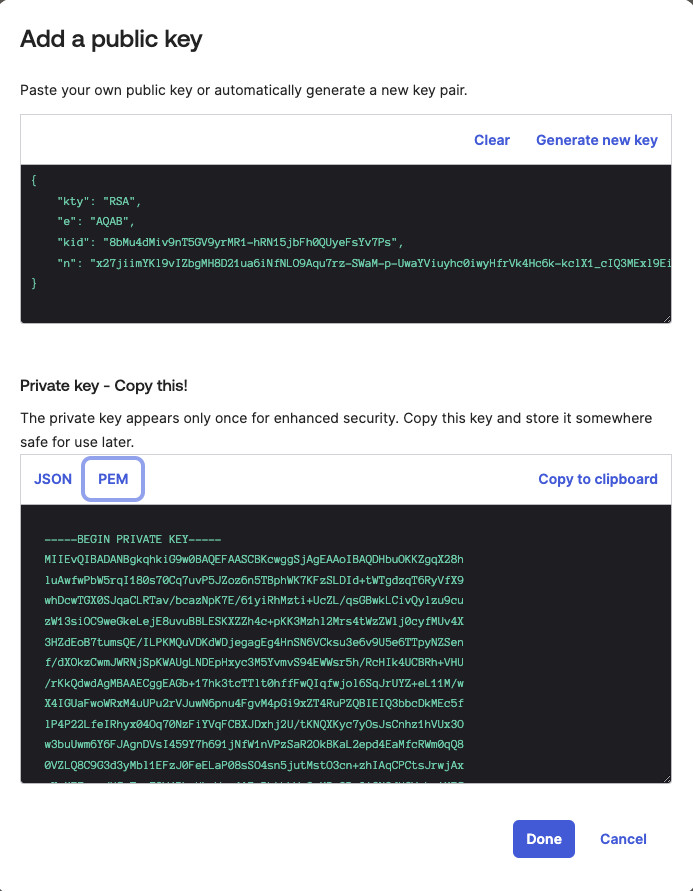
- Client ID
- Key ID of the Public Key added for the Service App
- RSA Private Key in PEM format
Procedure🔗
-
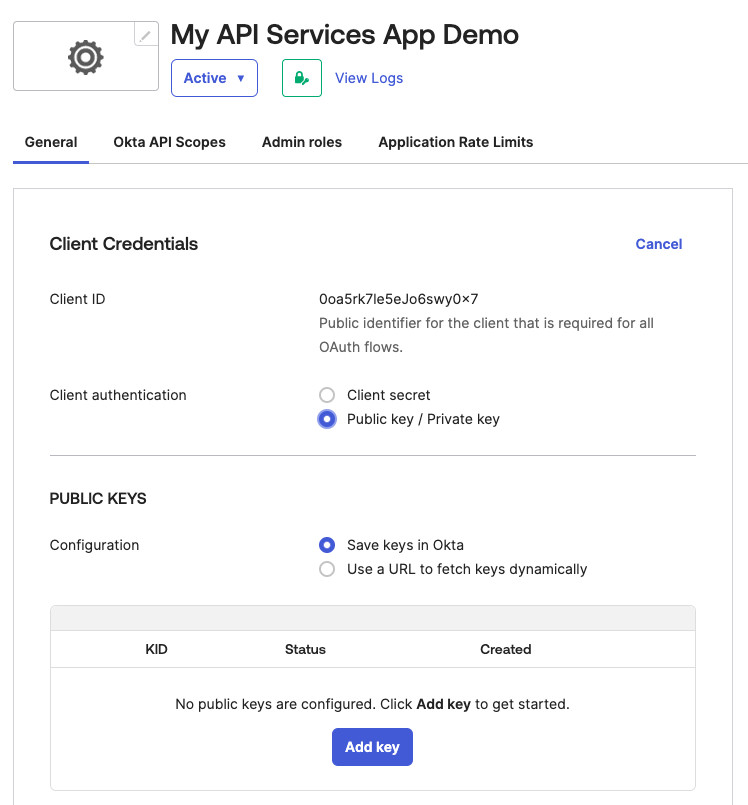
Create a service app integration in the Okta Admin console.
Create the Service App -
Use the following settings:
- Client Authentication — Public Key / Private Key
- Public Key Configuration — Save keys in Okta
-
Generate a JWK key pair or use an existing key pair.
Add the Key Pair 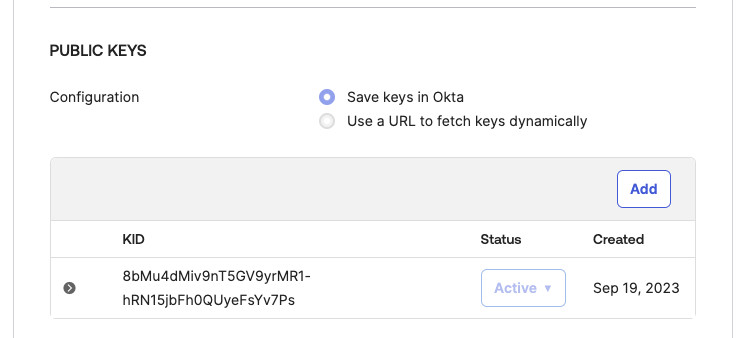
Create the Key Pair -
Grant allowed scopes. The
okta.logs.readscope is required.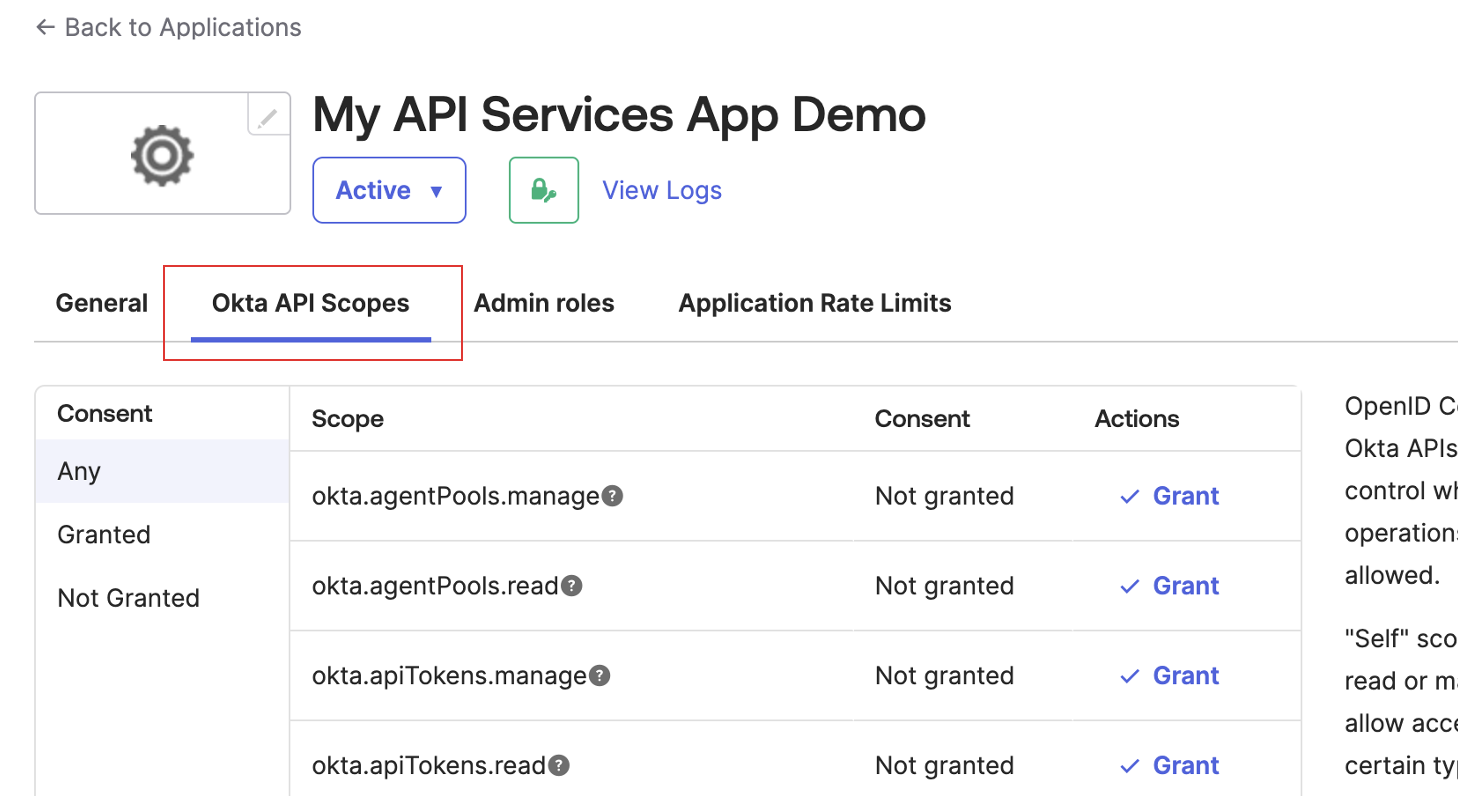
Okta API Scopes 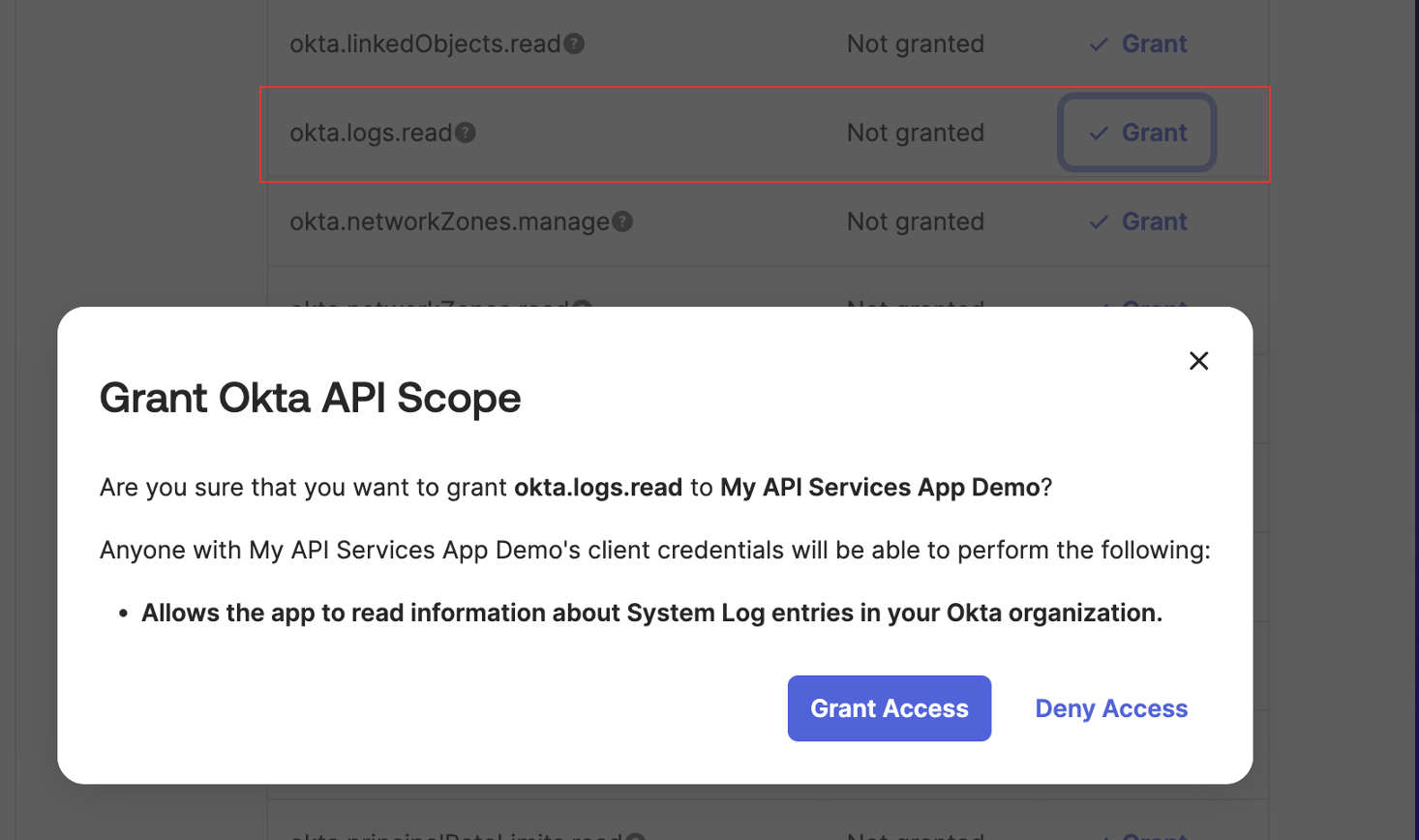
Grant the okta.logs.read Scope -
Assign admin role. The
Report Administratorrole is required.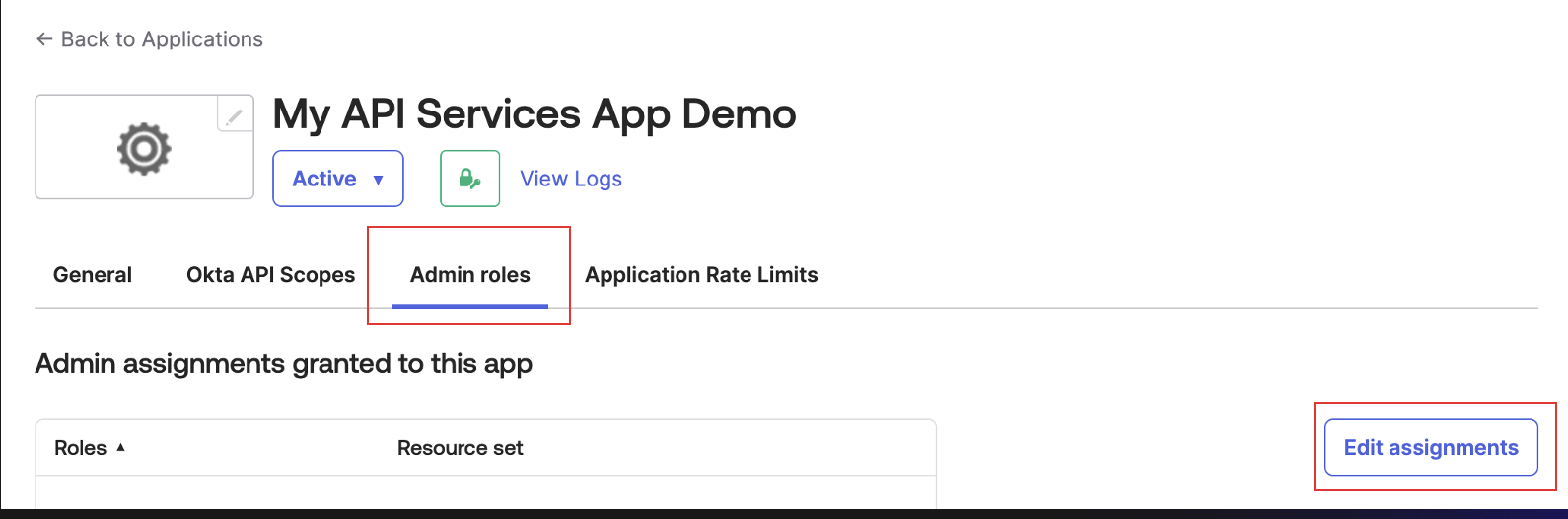
Grant the Required Role 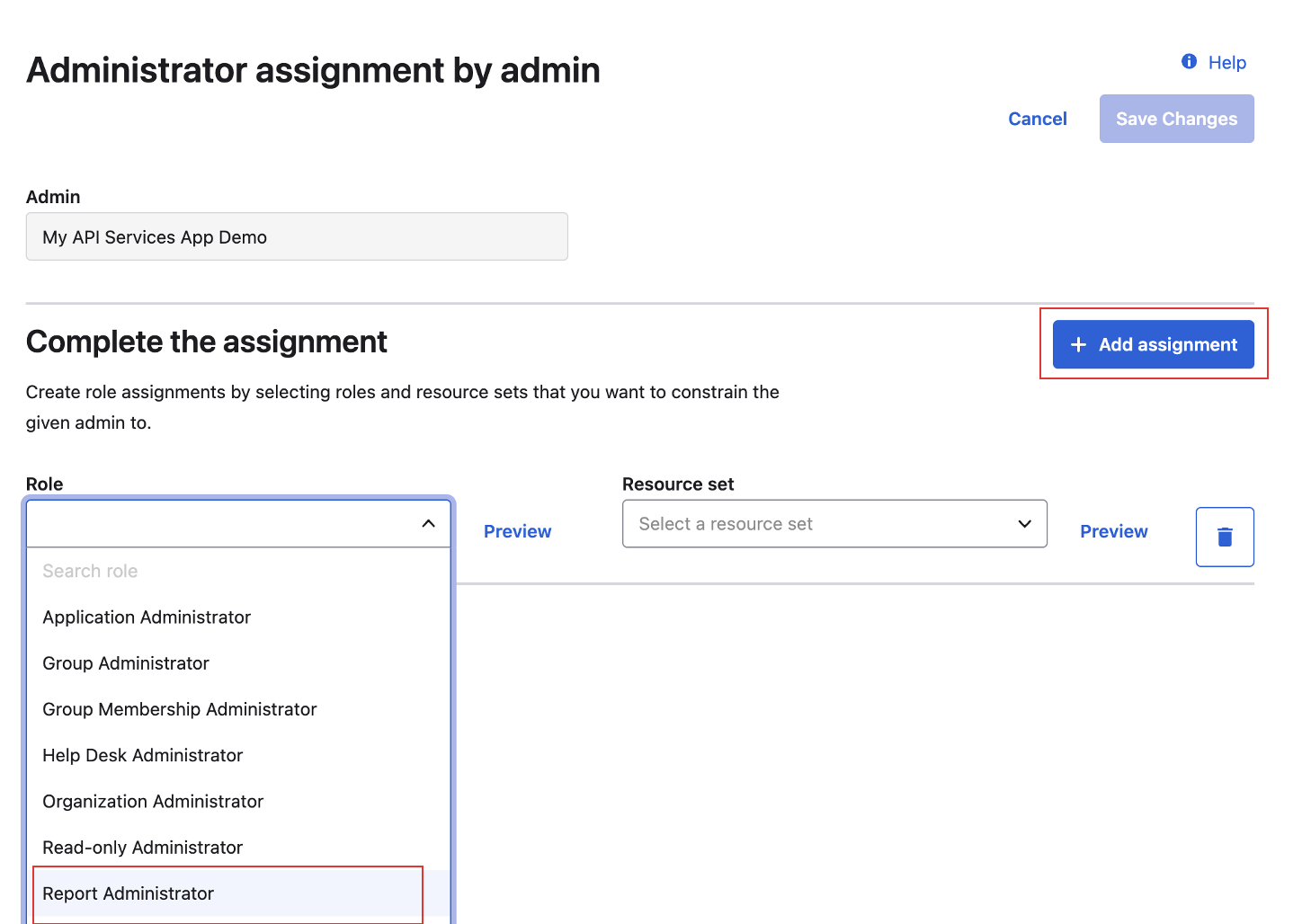
Grant the Required Role
Add Integration in XDR🔗
-
From the Taegis Menu, select Integrations → Cloud APIs.
-
Select Add an Integration from the top of the page.

Add an Integration -
From the Optimized tab, select Okta.

Create the Okta Integration -
Enter the following fields:
- Integration Name — Any unique string
- Org URL/Issuer URL — The URL instance of your Okta account
Note
The Org URL is found in your browser’s address bar after logging in to your Okta portal and takes the format
https://xxxxxxxx.okta.com,https://xxxxxxxx.okta-emea.com, orhttps://xxxxxxxx.oktapreview.com.- Client ID — Generated when the service app was created
- Key ID (KID) — KID that specifies the Public Key used when the service app was created
-
Upload the Private Key created in the previous section.
-
Select Done. The Manage Integrations page displays with the successfully added Okta integration listed under Cloud API Integrations.
Tip
You can use the Integration Name defined in step 3 above to identify the integration within the Cloud API Integrations table.
Events Received from Okta🔗
The following ingest events are received from Okta integrations and normalized to the auth schema:
app.oauth2.as.authorize.codeapp.oauth2.as.token.grant.access_tokenapp.oauth2.as.token.grant.id_tokenapp.oauth2.as.token.grant.refresh_tokeninline_hook.response.processedpolicy.evaluate_sign_onpolicy.lifecycle.activatepolicy.lifecycle.createpolicy.lifecycle.deactivatepolicy.lifecycle.updatepolicy.rule.addpolicy.rule.deactivatepolicy.rule.updateuser.account.privilege.grantuser.account.reset_passworduser.account.update_passworduser.account.update_profileuser.authentication.auth_via_mfauser.authentication.ssouser.authentication.verifyuser.mfa.factor.activateuser.mfa.factor.deactivateuser.mfa.factor.reset_alluser.session.clearuser.session.enduser.session.startsystem.sms.send_phone_verification_messagesystem.voice.send_phone_verification_call
The following ingest events are received from Okta integrations and normalized to the cloudaudit schema:
system.api_token.createsystem.api_token.create.revokeapplication.user_membership.addapplication.user_membership.change_passwordapplication.user_membership.removeuser.session.access_admin_appuser.lifecycle.activateuser.lifecycle.createuser.lifecycle.deactivate
The following ingest events are received from Okta integrations and normalized to the generic schema:
application.provision.user.syncgroup.user_membership.addgroup.user_membership.removepolicy.evaluate_sign_onsystem.import.completesystem.import.startuser.account.report_suspicious_activity_by_enduseruser.account.update_passworduser.authentication.authenticateuser.credential.enrolluser.lifecycle.delete.initiateduser.lifecycle.reactivateuser.lifecycle.suspenduser.lifecycle.unsuspenduser.authentication.sso
Related Topics🔗
For more detailed information about managing Okta integrations, see these related topics: