OPNsense Integration Guide🔗
OPNsense must be configured to send logs via Syslog to the Taegis™ XDR Collector. Logs are filtered and correlated in real-time for various security event observations.
Follow the instructions below to configure logging and enable monitoring by Secureworks® Taegis™ XDR.
Connectivity Requirements🔗
| Source | Destination | Port/Protocol |
|---|---|---|
| OPNsense Firewall | XDR Collector (mgmt IP) | UDP/514 |
Data Provided from Integration🔗
| Normalized Data | Out-of-the-Box Detections | Vendor-Specific Detections | |
|---|---|---|---|
| OPNsense Firewall | Netflow |
Note
XDR detectors are not guaranteed to be triggered, even if a data source's logs are normalized to a schema associated with a given detector. However, you can create Custom Detection Rules to generate detections based on normalized data from a data source.
Configuration Instructions🔗
Within the OPNsense console, navigate to System > Settings > Logging / targets.
-
Select Add and create a new destination entry as follows:
- Enabled — Checked / selected
- Transport — UDP(4)
- Applications — filter (filterlog)
- Levels — info, notice, warn, error, critical, alert, emergency
- Facilities — Nothing selected
- Hostname — The IP address of the XDR Collector
- Port — 514
- rfc5424 — Unchecked / unselected
- Description — FilterLog
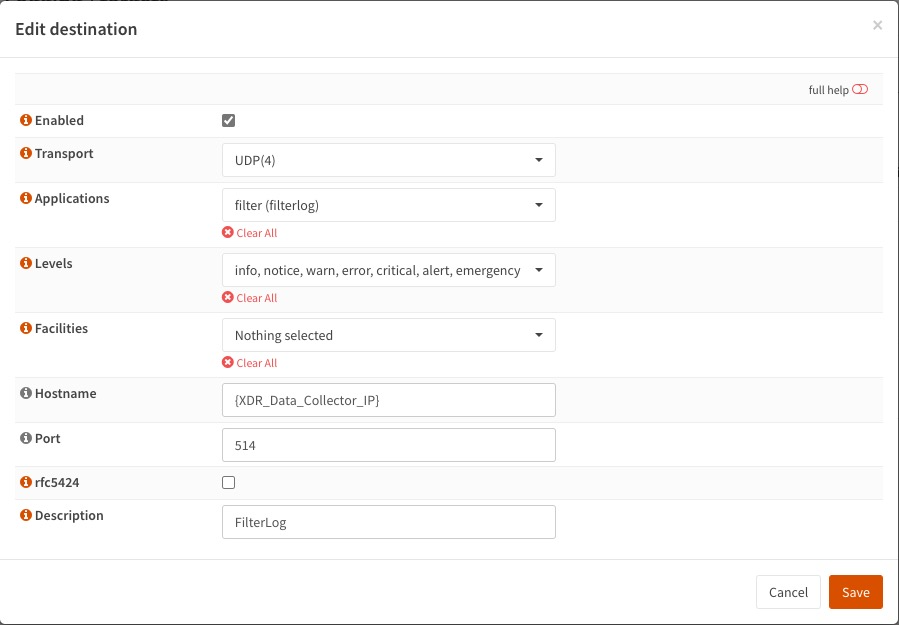
Destination for FilterLog -
Select Save to save the destination entry.
-
Select Apply to apply the logging configuration.
Your OPNsense appliance is now logging to XDR.
Note
OPNsense filterlog events are normalized as XDR Sensor Type
pfSense Firewall.