AWS Data Collector🔗
Secureworks® Taegis™ XDR has a collector that can be set up in an Amazon Web Service (AWS) instance. The XDR for AWS is provided as an Amazon Machine Image (AMI). During provisioning a valid AWS account number (9 digit number) and AWS region are required so that the appropriate AMI is authorized for your AWS account. Each collector is uniquely identified by its configuration. Configuration data is injected into an AWS EC2 instance via user data. For convenience, a sample AWS CloudFormation template is generated for your XDR Collector upon completion of the provisioning process.
Template Update
The CloudFormation template has been simplified as of July 15, 2026. Templates downloaded on or after this date create a single EC2 instance with a SecurityGroup, replacing the previous LaunchTemplate, AutoScalingGroup, and NetworkLoadBalancer. See Legacy Template Notes if you deployed before this date.
The sample template creates the following resources:
- EC2 Instance — a single EC2 instance running the XDR collector AMI, with configuration injected via user data.
- SecurityGroup — a SecurityGroup attached to the XDR AWS Collector instance in order to allow
udp/514,tcp/601, andtcp/udp 10514–10530traffic.
XDR provides options to download the sample template or launch it directly. The sample template should work in most VPC environments, but should be carefully reviewed to ensure it conforms to all network and security policies. Advanced users may extract the AMI ID and user data from the template to incorporate into their own IaC or automation tools.
Configuration Notes🔗
-
The sample template creates a SecurityGroup attached to the XDR AWS Collector instance that allows udp/514 and tcp/601 traffic from the VPC IPv4 CIDR address supplied as the
VpcCidrtemplate parameter. A secondary IPv4 CIDR address will be also be authorized, if supplied, as theSyslogIngresstemplate parameter. If your network policies, security policies or network requirements are different it may require modifications to the sample template. -
The XDR AWS collector does not support a highly available (HA) setup. Running more than one collector with the same configuration (user data) is not supported.
-
The sample template allocates a 200G EBS volume attached as
/dev/sdbto the collector. If you customize the template or implement your own automation ensure that the device is always attached as/dev/sdbwith a minimum size of 200G.
Note
The XDR Collector can support up to 200K EPS (events per second) for properly configured cloud and on-premises collectors.
Note
Third-party tools or applications cannot be installed on any XDR Collector.
CloudFormation (CF) Template Parameters🔗
-
CollectorName: This parameter specifies the unique name for the EC2 instance representing the AWS Collector. This name is displayed in the AWS EC2 console under "Instances."
-
VpcId: This parameter identifies the Amazon Virtual Private Cloud (VPC) where the resources will be deployed. Ensure this VPC ID is accurate, as it determines network accessibility for your collector.
-
Subnets: The subnet within the specified VPC where the collector EC2 instance will be launched. The first subnet in the list is used.
-
SyslogIngress: An optional CIDR block to permit as an additional syslog traffic source to the collector, in addition to the VPC CIDR. Leave blank if not required.
Parameter Reflection in AWS Management Console🔗
-
CollectorName: After stack creation, the EC2 instance named as specified in the
CollectorNameparameter can be found under the EC2 console. It will help you identify the collector instance among others in your account. -
VpcId and Subnets: The
VpcIdandSubnetsparameters determine in which VPC and subnet the EC2 instance is deployed. You can review these configurations under the EC2 instance details to verify correct network placement. -
SyslogIngress: The
SyslogIngressparameter configures additional security group ingress rules on the collector instance. You can verify these rules in the AWS Management Console under Security Groups.
Additional Resources🔗
For more information on configuring AWS components, refer to the following AWS documentation:
Legacy Template Notes🔗
Templates downloaded before July 15, 2026, created the following resources:
- LaunchTemplate — Defined EC2 parameters including the correct regional AMI and user data.
- AutoScalingGroup — A statically-sized group that created the collector EC2 instance. The ASG size must always be set to
1— running multiple collectors with the same configuration is not supported. - NetworkLoadBalancer — Provided a layer 4 NLB for TCP/UDP traffic with a consistent DNS name. The
CTPxCollectorDnsNamestack output provided the DNS name for syslog forwarding. An NLB was used because it preserves the original client IP address and supports UDP — ALB and ELB types are not compatible with the collector. - SecurityGroup — Allowed
udp/514andtcp/601traffic.
Note
If your legacy deployment's AutoScalingGroup cycles instances with the error Client.InternalError: Client error on launch while using EBS Encryption, check that the KMS key policy meets the requirements for EBS encryption.
To migrate to the simplified template, redeploy your collector from XDR to download the updated CloudFormation template.
Connectivity Requirements for Data Collectors🔗
Note
Some configuration specifics of XDR depend on the region you are deployed in (US1, US2, US3, EU1, EU2).
Any device that uses its own SSL certificate, including Cloud-based and On-Premises Data Collectors, must safelist the following destination IP addresses or domains in order to avoid conflict. If using an AWS data collector, please refer to the AWS table.
For Most Data Collectors🔗
| Source | Destination | Port/Protocol | Notes |
|---|---|---|---|
| Data Collector IP or hostname | US1collector.ctpx.secureworks.com18.217.45.178/32 3.16.4.173/32 18.224.219.97/32 13.59.146.90/32 3.16.16.254/32 18.223.74.238/32 US2collector.delta.taegis.secureworks.com52.14.113.127/32 3.141.73.137/32 3.136.78.106/32 US3collector.foxtrot.taegis.secureworks.com44.229.101.49 35.166.77.47 34.214.135.78 EU1collector.echo.taegis.secureworks.com18.158.143.139/32 35.159.14.37/32 52.59.37.234/32 EU2collector.golf.taegis.secureworks.com54.217.251.111/32 54.194.78.20/32 52.50.215.147/32 |
TCP/443 | Safelisting device access to XDR |
| Data Collector IP or hostname | NTP severs IP/Hostnames provided during provisioning | UDP/123 | Safelisting device access to NTP servers This rule is only necessary when custom NTP servers are provided during provisioning. |
| Data Collector IP or hostname | 0.pool.ntp.org 1.pool.ntp.org 2.pool.ntp.org 3.pool.ntp.org |
UDP/123 | Safelisting device access to default NTP server. This rule is only necessary when custom NTP servers are not provided during provisioning. |
| Data Collector IP or hostname | DNS server IPs provided during provisioning | UDP/53 TCP/53 |
Safelisting device access to DNS servers |
Note
If using local NTP, the access must be safelisted both to and from the data collector on those networks.
For AWS Data Collectors🔗
| Source | Destination | Port/Protocol | Notes |
|---|---|---|---|
| AWS Data Collector IP or hostname | US1collector.ctpx.secureworks.com18.217.45.178/32 3.16.4.173/32 18.224.219.97/32 13.59.146.90/32 3.16.16.254/32 18.223.74.238/32 US2collector.delta.taegis.secureworks.com52.14.113.127/32 3.141.73.137/32 3.136.78.106/32 US3collector.foxtrot.taegis.secureworks.com44.229.101.49 35.166.77.47 34.214.135.78 EU1collector.echo.taegis.secureworks.com18.158.143.139/32 35.159.14.37/32 52.59.37.234/32 EU2collector.golf.taegis.secureworks.com54.217.251.111/32 54.194.78.20/32 52.50.215.147/32 |
TCP/443 | Safelisting device access to Taegis XDR via hostname |
| AWS Data Collector IP or hostname | NTP severs IP/Hostnames provided during provisioning | UDP/123 | Safelisting device access to NTP servers This rule is only necessary when custom NTP servers are provided during provisioning. |
| AWS Data Collector IP or hostname | 169.254.169.123 | UDP/123 | Safelisting device access to default NTP server. This rule is only necessary when custom NTP servers are not provided during provisioning. |
| AWS Data Collector IP or hostname | DNS server IPs provided during provisioning | UDP/53 TCP/53 |
Safelisting device access to DNS servers |
Proxy Support🔗
Cloud-based and On-Premises Data Collectors attempt to discover local proxy settings on the host if they are unable to connect directly to the internet.
Cloud-based and On-Premises Data Collectors also support a hard-coded proxy. If you need to create a data collector that contains a hard-coded proxy, please submit a support request with the following required information:
- Proxy IP
- Proxy Port
If the proxy is configured but is unavailable or not reachable, the data collector will fall back to a direct connection.
Note
Cloud-based and On-Premises Data Collectors do not support hard-coded authenticated proxies at this time. A proxy with man in the middle (MITM) capability needs to safelist the above network connections.
Install and Configure an XDR AWS Collector🔗
Start the process to configure your XDR AWS Collector in XDR from Integrations > Data Collectors. It will create a template for you, then forward you to your AWS Console to complete the configuration.
- Select Integrations from the Taegis XDR menu and then choose Data Collectors.
-
Select Actions > Add Collector from the top right.
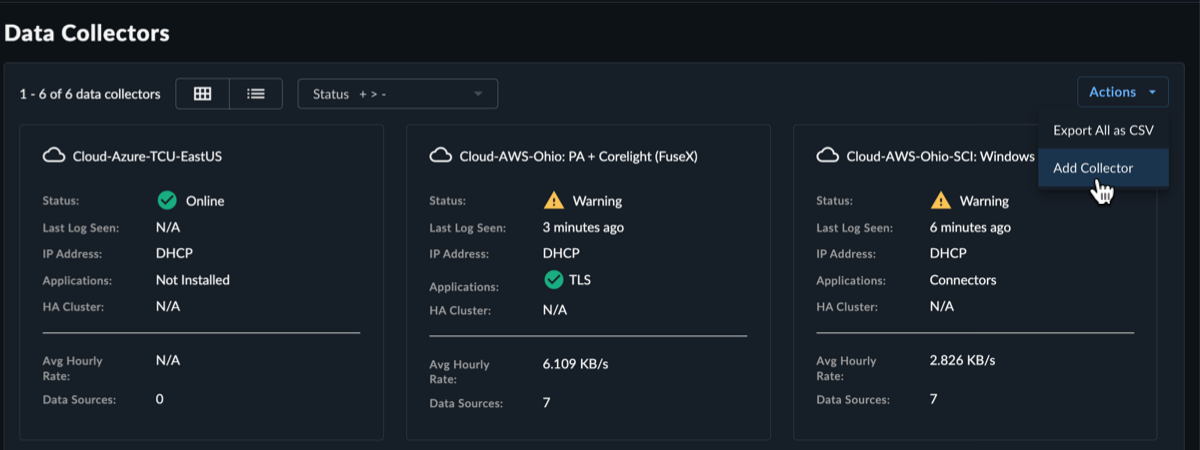
Add New Collector -
Select Cloud-Hosted as the collector type and then select Next.
-
Fill in the required name and hostname fields, and the optional description, host proxy, and NTP servers fields, and then select Create Collector.
Note
You have the option to specify your own NTP servers if desired, and to add an HTTP proxy address, which must follow the following format:
[http\[s]://\[user:pass@]hostname\[:port]|http://<hostname>[:port]].Note
Default and custom NTP settings are only used during the bootstrap process on startup. Once connectivity is established, the Data Collector synchronizes time via the XDR backend connection. The NTP server value will be reflected as
ntp.collectorin the Admiral console once the connection is established.
Create Cloud Collector Tip
To add the eStreamer app to the collector to retrieve all security event logs from your Cisco Firepower Threat Defense (FTD) device, see eStreamer App. For more information, see the Cisco FTD Firewall guide.
-
The Install Collector section displays the following options:
- Amazon Web Services (AWS) — This option is for deploying the XDR Collector to AWS.
- Google Cloud Platform (GCP) — This option is for deploying the XDR Collector to GCP.
- Microsoft Azure — This option is for deploying the XDR Collector to Azure.
-
Select Amazon Web Services (AWS).
- Enter your AWS Account ID.
- Select the AWS region you want to deploy from.
-
Select Launch Console.

AWS Collector Note
You can also download the .yaml template for your XDR AWS Collector and then use that template to configure the collector in your AWS account by selecting Download. Read the Configuration Notes for more information on what the template provides.
-
The AWS console displays the CloudFormation Create stack page in a new browser window with a preloaded CloudFormation template (YAML) that includes parameters for the collector image and network configuration.
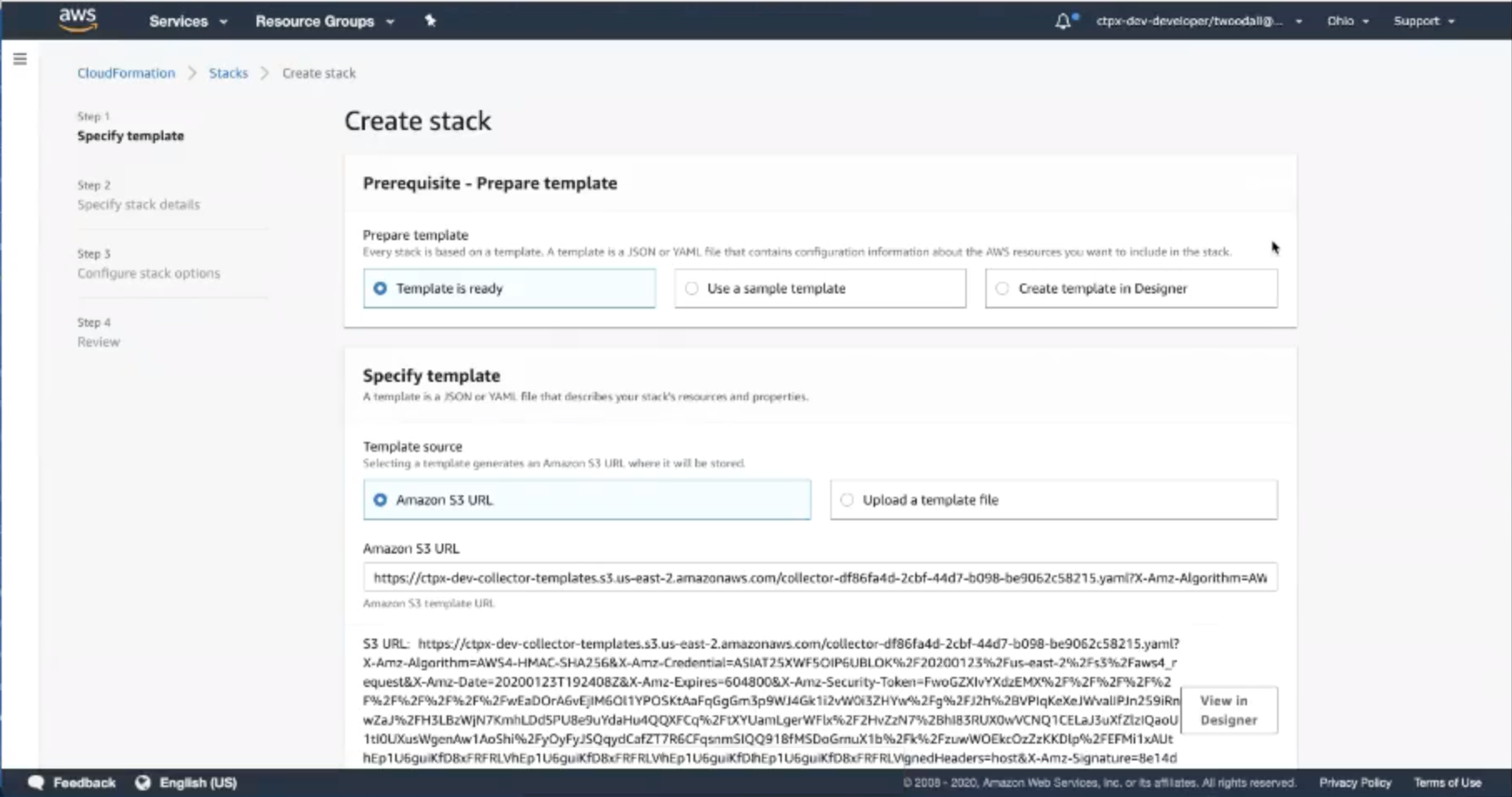
Create stack You need to configure the parameters particular to your instance, however:
-
Give your new collector a name in the CollectorName field.
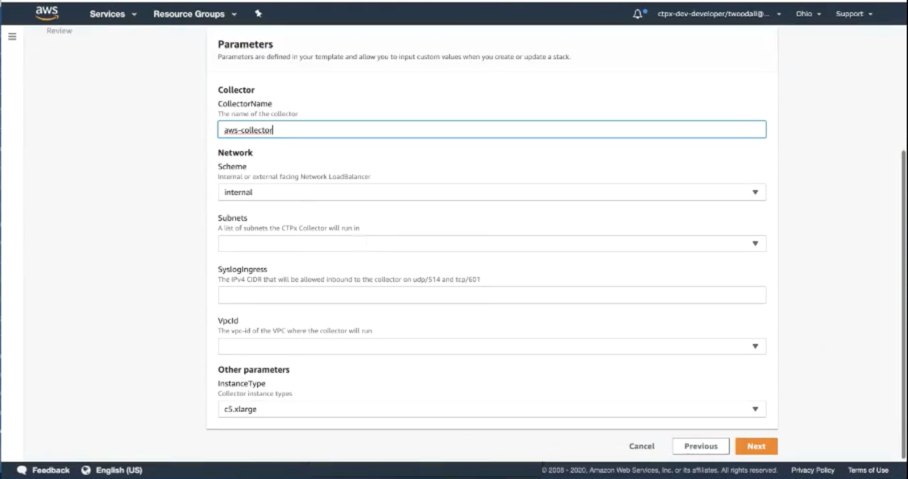
Collector Name -
Under Subnets select the subnet(s) in your VPC that you want to deploy the XDR AWS Collector on.
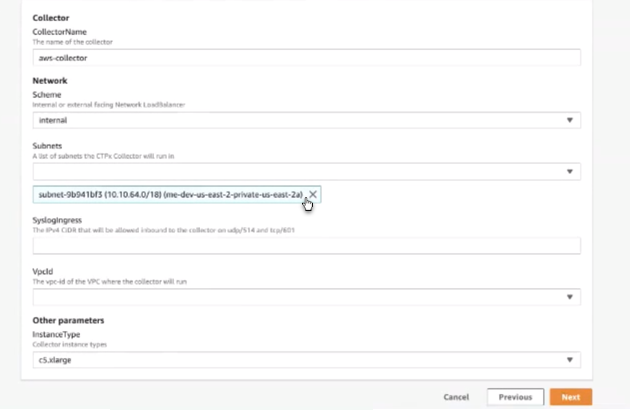
Select a subnet -
If you want to configure which subnet(s) in the VPC can access the Collector, add a firewall rule in SyslogIngress following IP syntax. For example, if you put in
0.0.0.0/0it would allow everything, or you can limit it to your VPC subnet, etc. - Add the VpcId of the VPC you want to deploy.
- The InstanceType for your deploy is preset at
c5.xlarge. Note thatc5.xlargehas a virtual system of 4 CPUs and 8GiB memory. - You may optionally add a
KmsCmkArnif you want to enforce EBS Encryption. - Select Next. The Configure stack options page displays.
- Select and confirm any options you want to add.
- When you are satisfied with the options, select Create stack to create the instance. It automatically launches the deployment.
-
It may take a few minutes for the collector to build and deploy. You can confirm the collector status from Integrations > Data Collectors in XDR.
Note
AWS assigns IPs for the XDR AWS Collector dynamically, so the IP address for the collector will not appear in the Address column of the XDR Integrations Collectors table.
Access Troubleshooting Console🔗
The Admiral console allows you to access information about a deployed XDR Collector locally. The tools provided within Admiral assist in device setup and troubleshooting of common problems such as network connectivity.
For more information, see Admiral Console.
Edit Your XDR Collector Configuration🔗
Important
Making changes to the XDR Collector configuration of a live system carries the risk of rendering the device inoperable. The XDR Collector will make every attempt possible to rollback to the previous configuration when a configuration change is unsuccessful. XDR Collector configuration changes should be treated with the same level of caution used for any other kind of change in your environment according to your risk and change management guidelines. You should always be prepared to redeploy the device.
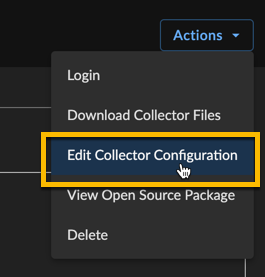
Certain configuration parameters of a running and healthy XDR Collector can be changed on a live collector. To edit these parameters, select Actions and choose Edit Collector Configuration from a collector details page. Editable fields include the hostname, proxy settings, and NTP server. If you require a change to the network interface configuration, it is required to provision a new XDR Collector.
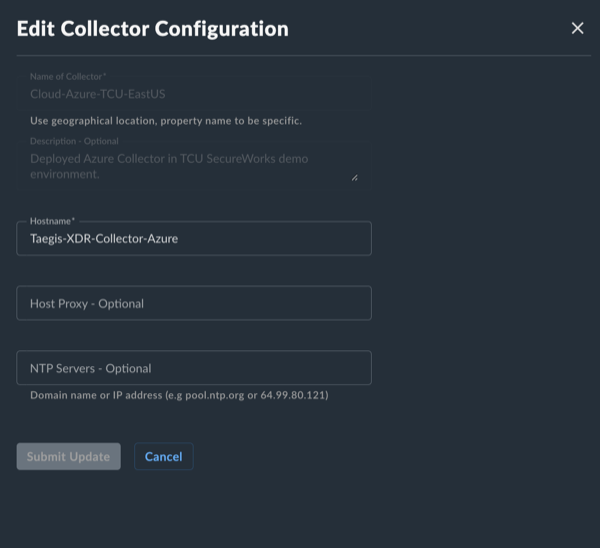
After submitting a XDR Collector configuration change, a banner will appear to indicate that the change is pending and the edit action will no longer be available until the change has completed. The pending changes will be pushed to your XDR Collector where they will be applied and connectivity testing conducted.

If the pending changes result in the XDR Collector no longer able to successfully connect, the change will be rolled back to the previous configuration and a failure message will appear in the banner.

If the change is successful, you will receive a successful message in the banner once the change has completed.

In rare circumstances, it’s possible that the configuration change and rollback are both unsuccessful. Example scenarios include, but are not limited to, changes to the underlying network during the change or network connectivity failures to the backend during an inflight change. In these circumstances, you will see a failure banner and the XDR Collector will need to be redeployed.

Once the change is complete, download the new AWS CloudFormation and apply the updates to your current AWS CloudFormation Stack. This ensures that your new configuration is used when and if the instance is replaced in AWS.
