Query Editor🔗
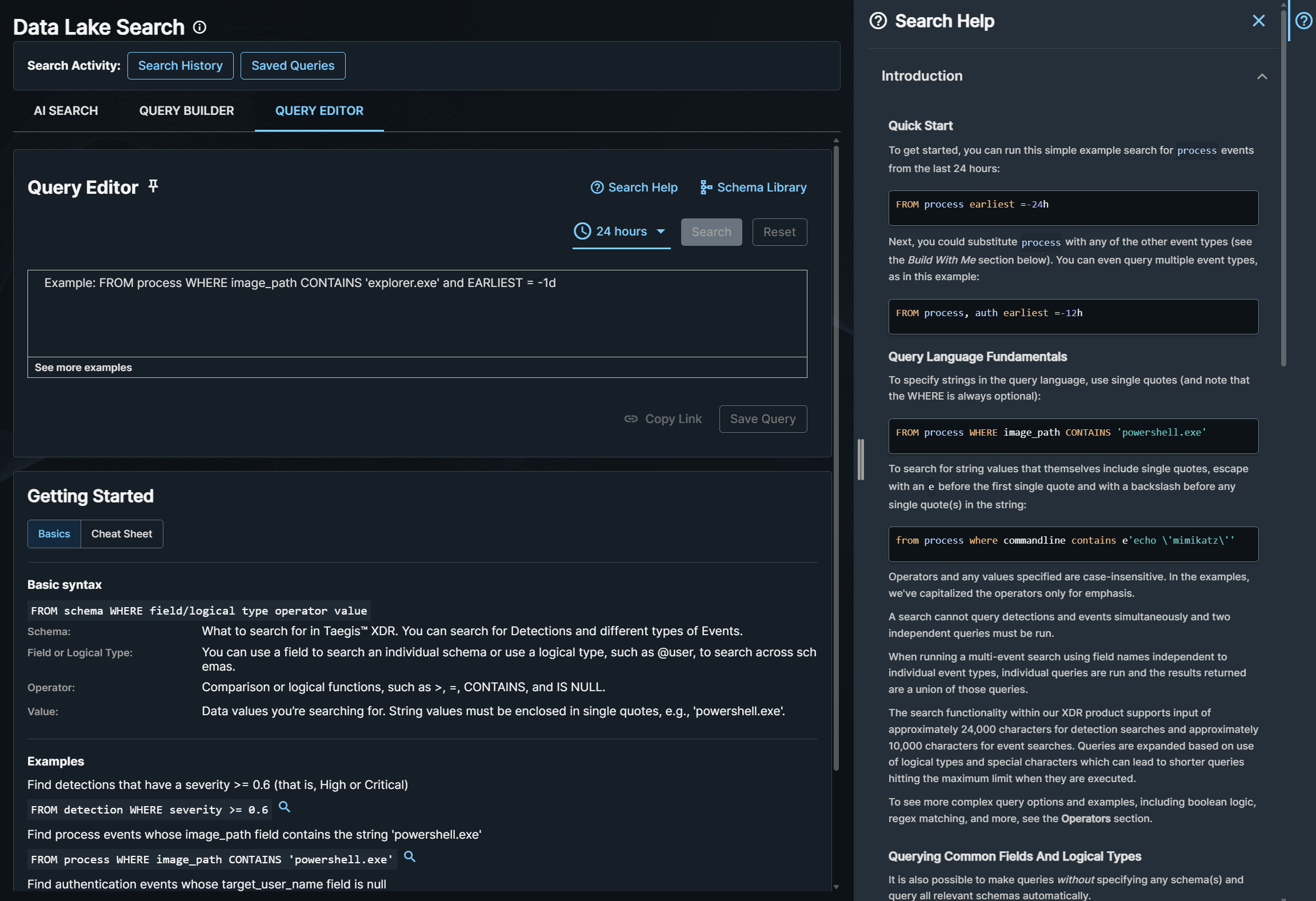
Data Lake Search Query Editor allows you to write advanced, flexible queries for detections and events in your tenant using the custom syntax of Advanced Search query language.
To access Query Editor, do as follows:
- From the Taegis Menu, go to Advanced Search > Data Lake Search.
- Click the Query Editor tab.
Anatomy of a Query🔗
An Advanced Search query has the following structure:
Search Help🔗
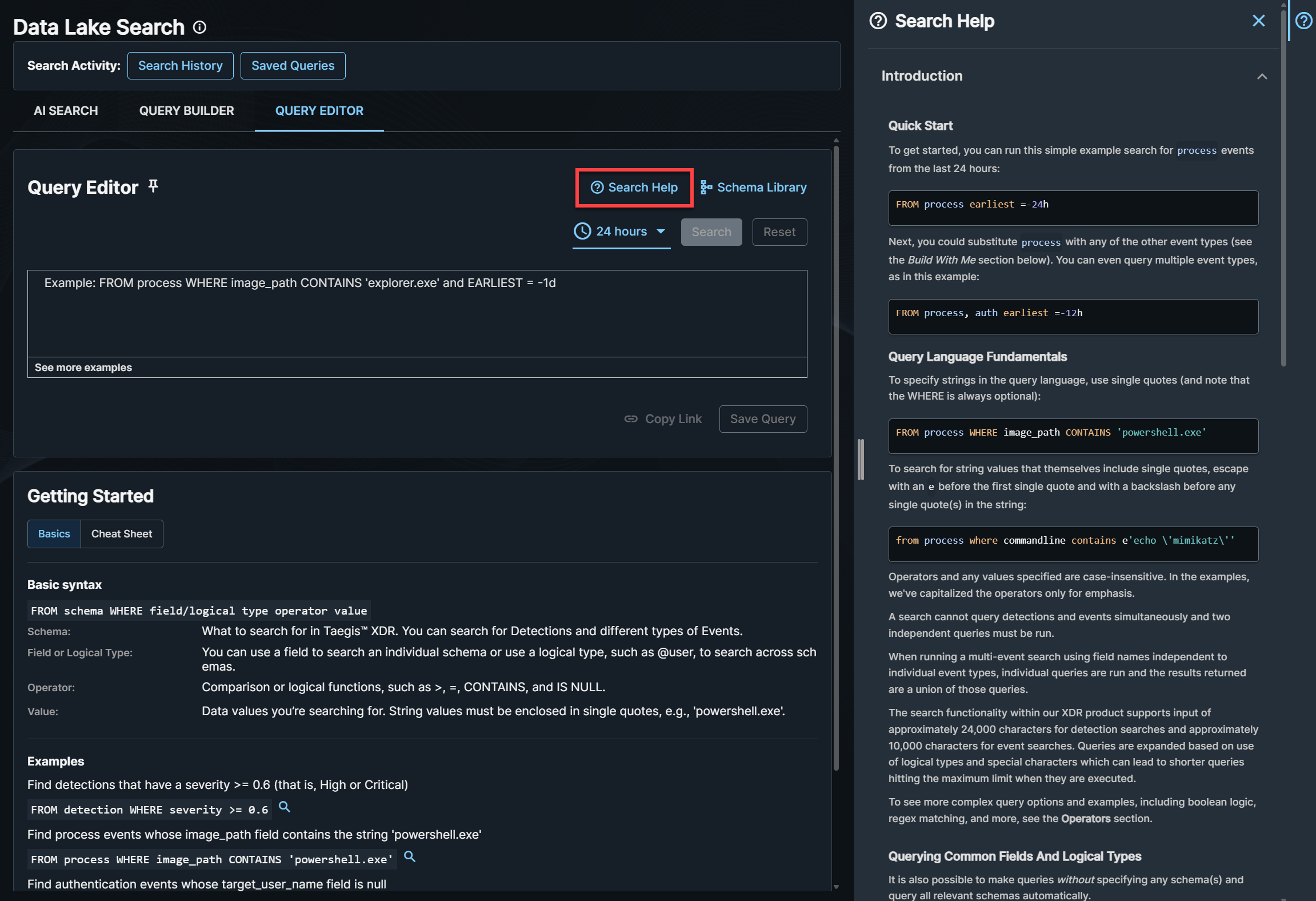
In Query Editor, click the Search Help icon to open the inline help that includes:
- Build with Me section that helps you craft successful queries
- Basic syntax
- Available data types (schemas) and field names (context-aware as you type)
- Operators
- Examples
Tip
There is also a Getting Started section beneath the query prompt containing basic guidance.
Click Schema Library for a reference of all searchable schemas and fields.
Core Concepts🔗
Schemas🔗
- Schemas are a category of data similar to a relational database table. Examples include
process,auth, andnetflow. Detections use thedetectionschema. For more details, see Schemas. -
You can select one or more schemas with
FROM.Tip
You can omit
FROMwhen using logical types. The engine targets relevant schemas automatically. -
A search cannot query detections and events simultaneously and two independent queries must be run.
Time Window🔗
- Adjust the time range at the top of the page. The default range is 24 hours.
- Alternatively, add
earliestand/orlatestto bound the time range. See Time Ranges.
Filters (WHERE)🔗
WHEREis optional and can include multiple conditions joined withAND/ORand parentheses().-
Strings use single quotes. To include single quotes inside a string, use the
e'...'form and escape internal quotes like in the following example.
How Fields are Resolved🔗
- Unqualified field names (for example,
image_path) are matched against fields that exist in each selected schema. - In multi-schema queries (for example,
FROM process, auth), the engine runs a subquery per schema and returns the union of results. A condition affects only schemas where that field exists. - You may also reference fields with a schema prefix for clarity (for example,
process.commandline). -
Find events that were used to generate a detection using
detection.resource.id.Supported operators:
IS NOT NULL=CONTAINSIN
Note
Secureworks® Taegis™ XDR employs rate limiting on event searches to ensure consistent and optimum performance. For details, see Rate Limits on Event Search.
- You can filter by detection fields (for example,
title) or by event fields related to the detection. -
When using event fields in a detection search, prefix with the event schema (for example,
process.commandline).
- Common fields exist in multiple schemas (for example,
sensor_type). Using them returns results wherever they exist. -
Logical types prefixed with
@expand to the appropriate fields across relevant schemas (for example,@ip,@user). For more information, see Logical Types.
Key Rules and Guardrails🔗
- You cannot query detections and events in the same query; run separate queries when needed.
- For detection searches using event fields, always prefix the field with the event schema (for example,
process.image_path). -
Regular expressions differ by backend:
- Events use a Java-compatible regex engine. See the Java regex documentation for notation help.
- Detections use a Lucene-based regex engine. See the Elastic regex documentation for notation help.
-
Hostnameis a special case that translates tohost_idand supports only literal operators (=,!=,IN,!IN). Hostname matching is case-sensitive: -
The
@rawLogical Type and theoriginal_datafield can access only the last 20 days of data. For longer periods, run in 20-day increments or narrow the time range. - Operators and values are case-insensitive, except for hostname translation as noted above.
- Query length limits apply; expansions from logical types and special characters can cause short-looking queries to hit limits at execution.
Arrays🔗
Queries over array fields are flattened, so you can search for matches across any element using standard field.subfield notation:
FROM http WHERE http_response_headers.record.key = 'Authorization' AND http_response_headers.record.value = 'Bearer 1234'
Tip
The query above finds records that have an 'Authorization' header and a header with value 'Bearer 1234', but it does not guarantee these belong to the same header record. Matching on specific array indices is not supported.
Operators and Booleans🔗
- Operators are case-insensitive and include:
=,!=,>,>=,<,<=,CONTAINS,MATCHES,MATCHES_REGEX,IN,IS NULL,IS NOT. - Combine conditions with
AND/OR/NOT. Use parentheses to ensure intended logic, especially in multi-condition queries. - All string values must be enclosed in single quotes and are interpreted as literals.
See the table below for a list and description of Advanced Search query language operators and booleans:
| Operator | Description |
|---|---|
= <literal> |
Case-insensitive exact match. |
!= <literal> |
Boolean NOT of equality. |
> <number> |
Numeric greater than. |
>= <number> |
Numeric greater or equal. |
< <number> |
Numeric less than. |
<= <number> |
Numeric less than or equal. |
CONTAINS <string> |
Case-insensitive substring match of string literal in field. |
<fieldname> !CONTAINS <string exclusion> |
Negation of case-insensitive substring match of string literal in field. |
MATCHES <string> |
Case-sensitive wildcard match of glob-style string pattern in field. |
<fieldname> !MATCHES <string exclusion> |
Negation of case-insensitive wildcard match of glob-style string pattern in field. |
MATCHES_REGEX <string> |
Case-insensitive regex match of string pattern in field. |
!MATCHES_REGEX <string> |
Negation of case-insensitive regex match of string pattern. |
IN <value list> |
Boolean expression evaluates true if field value is contained in value list. |
!IN <value list> |
Boolean expression evaluates true if field value is not contained in value list. |
IS NOT NULL |
Tests for the existence of field and that it is not null. |
IS NULL |
Returns true if the specified field does not exist or is null. |
Reserved Words🔗
The following identifiers are reserved words that are case insensitive and must be accompanied by single quotes if used in search terms as literal values.
AGG, AGGREGATE, AND, AS, ASC, AVG, BY, CONTAINS, COUNT, CARDINALITY, DESC, DESCENDANT, EARLIEST, FALSE, FIELDS, FROM, HEAD, IN, IS, INDEX, LATEST, MATCHES, MATCHES_REGEX, MAX, MIN, NOT, NOW, NULL, OF, OR, SEARCH, SORT, SUM, TAIL, TOP, TRUE, WHERE
CIDR Notation🔗
Advanced Search query language supports CIDR notation for IP address fields when using the = (literal), MATCHES, or IN operators. Query language also supports CIDR notation with the negated forms of these operators, including !=, !MATCHES, and !IN.
At this time, CIDR notation is only supported for event queries. Detection queries do not support CIDR notation and a valid IP address must be used.
Examples
Query netflow events where the source address is within the IP range 192.168.2.0/24:
FROM netflow WHERE source_address = '192.168.2.0/24'
Query netflow events where the IP address is within an IPv6 CIDR range:
FROM netflow WHERE @ip IN ('2001:db8::/32')
Note
The following MATCHES query acts as a textual wildcard match and not a CIDR query:
FROM netflow WHERE @ip MATCHES '192.168.2*'
The following MATCHES query acts as a CIDR query:
FROM netflow WHERE @ip MATCHES '192.168.2.*.*'
IPv6 comparisons are string literal unless you use CIDR
When you use =, CONTAINS, or MATCHES with an IPv6 address, the query compares the value as a literal string. Equivalent IPv6 representations, including compressed and expanded forms, don't match unless they use the exact same formatting.
To match reliably across formats, use IPv6 CIDR notation. For a single address, use /128.
IPv6 address caveats
IPv6 addresses can be represented in multiple equivalent ways. For example, all of the following represent the same address:
2001:db8:abcd:1234:0:1:0:0

2001:db8:abcd:1234:0:1::

2001:db8:abcd:1234:0000:0001:0000:0000
When you search with the =, CONTAINS, or MATCHES operators, IPv6 addresses are compared as literal strings. Only the exact format used in the query will match.
To match an IPv6 address reliably regardless of its format, use CIDR notation. CIDR notation normalizes IPv6 addresses before comparison, so all equivalent representations match.
Use a /128 prefix length to match a single address:
FROM email WHERE @ip IN ('2001:db8:abcd:1234:0:1::/128')
This query matches events regardless of whether the address was stored as 2001:db8:abcd:1234:0:1:0:0, 2001:db8:abcd:1234:0:1::, or the fully expanded 2001:db8:abcd:1234:0000:0001:0000:0000.
Time Ranges🔗
Constrain results using relative or absolute time bounds.
Syntax:
earliest=[+-]<delta><unit>[@unit]latest=[+-]<delta><unit>[@unit]- Units:
s(sec),m(min),h(hour),d(day),w(week),mo(month),y(year) @unittruncates to the boundary of that unit.
Behavior:
If only latest is provided, earliest defaults to the preceding 24 hours.
Examples
Note
Dates should be in the ISO 8601 standard, such as: (2019-07-01, 2019-06-01T00:00:00).
Functions🔗
Searches can be further qualified by piping results into additional functions.
search | functions
When the query searches across multiple data types, the function operates across each data type independently.
| Function | Description |
|---|---|
sort |
Sort results by specified fields and order.
|
head |
Return the first N results from each event type in search order. |
tail |
Return the last N results from each event type. tail reverses the order of the results before returning the last N. |
tolower |
Normalizes a string field to lowercase in BY grouping clauses to enable case-insensitive aggregations and consistent grouping regardless of original casing. |
toupper |
Normalizes a string field to uppercase in BY grouping clauses to enable case-insensitive aggregations and consistent grouping regardless of original casing. |
fields |
API-only. Include or exclude selected fields in results (acts like a column selector). By default, all fields except original_data are returned. Selecting only required fields can improve performance. |
Note
The fields function is available only via the API and is not available in the Secureworks® Taegis™ XDR UI.
Expand to see example queries using functions
-
Limit results per data type:
-
Sort within a single event type:
-
Sort within multiple event types (time fields only):
-
Sort with time truncation:
-
Counts auth events grouped by user, domain, and hostname with case normalization:
-
Counts auth events grouped by domain with uppercase normalization:
-
Select fields (API only):
Aggregations🔗
aggregate allows you to group the results of your query and perform listed operations on those results.
An aggregate query can take the following form:
| Operator | Description |
|---|---|
sum |
Calculate the sum of a field for every row returned by the query. |
min |
Find the smallest value of a field. |
max |
Find the largest value of a field. |
avg |
Find the average value of a field for every row returned by the query. |
count |
Count the number of rows which have a field. If no field is specified, all rows are counted. |
cardinality |
Count the number of rows which have a distinct, non-null value for a field. |
(aggregate) by |
Group or aggregate the results by the values of the field specified and show a count for each value. |
by
The by clause can either specify an optional field list or a time duration where the results will be grouped by the specified field(s) or time unit:
Unit is:
s— secondm— minuteh— hourd— day
Expand to see example queries using aggregations
-
Counts PowerShell-related process events in the last 24 hours, grouped by username:
-
For user
bob, returns the first and last authentication event times over the last three days: -
Counts DNS query events over the last day, aggregated into one-hour time buckets:
Note
Aggregation is supported for event queries only. In multi-event queries, aggregation runs per event type. Aggregating on logical types is not supported.
Common Query Patterns🔗
Expand to see some common query examples
-
Single schema by field:
-
Multiple schemas with a common field:
-
No
FROM(schema-agnostic via logical types) -
Detection by detection field:
-
Detection by related event field:
-
Logical type within a schema: