Close a Case🔗
Upon completing review of a case, you should close it using one of the following closed statuses.
Important
If you are a Secureworks® Taegis™ MDR subscriber, the Taegis MDR Dashboard relies on cases being closed for proper statistic calculation.
| Status | Description |
|---|---|
| Closed: Confirmed Security Incident | Your organization’s systems or data have been compromised or measures put in place to protect them have failed. The case is completed. |
| Closed: Authorized Activity | The activity is authorized or expected. The case is completed. |
| Closed: Threat Mitigated | The threat associated with the security incident has already been mitigated by a security control. The case is completed. |
| Closed: Not Vulnerable | The targeted system is not vulnerable to the exploit in question and therefore the case does not constitute a security incident. The case is completed. |
| Closed: False Positive Alert | The activity the detection indicated did not occur. This is not a security incident, so the case is closed as a false positive. |
| Closed: Inconclusive | The activity’s root cause has not been identified and there is no further activity detected. The case is completed. |
| Closed: Informational | Analysis conducted of the activity did not lead to any notable findings. The case is completed. |
Detection Resolution Status🔗
When a case is closed, its related detections and genesis detections are resolved automatically according to the case closed status you choose. The case statuses and corresponding detection resolution statuses are as follows:
| Case Closed Status | Corresponding Detection Resolution Status |
|---|---|
| Confirmed Security Incident | True Positive: Malicious |
| Authorized Activity | True Positive: Benign |
| Threat Mitigated | True Positive: Benign |
| Not Vulnerable | True Positive: Benign |
| False Positive Alert | False Positive |
| Inconclusive | Not Actionable |
| Informational | Not Actionable |
Tip
The default detection resolution behavior is to use the case closed status as indicated in the mapping table. However, you can override this default behavior and change the detection resolution status when you close the case.
Note
Detection statuses are one way the system can learn what activity is valuable to your organization based on data contained within the detections; therefore, it is important to choose the most relevant status based on the outcome of the case.
Close an Individual Case🔗
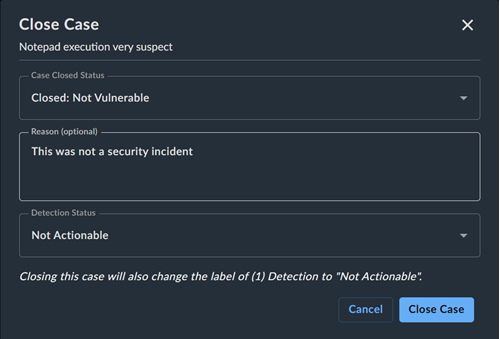
To close an individual case, do as follows:
- Open the case details page.
- In the Case Details section of the Overview tab, choose the appropriate closed status from the Status drop-down list.
- (Optional) In Close Case, enter a reason for closing the case.
- The detection status updates based on the chosen case closed status. Choose another, if desired.
- Click Close Case.
Close Multiple Cases🔗
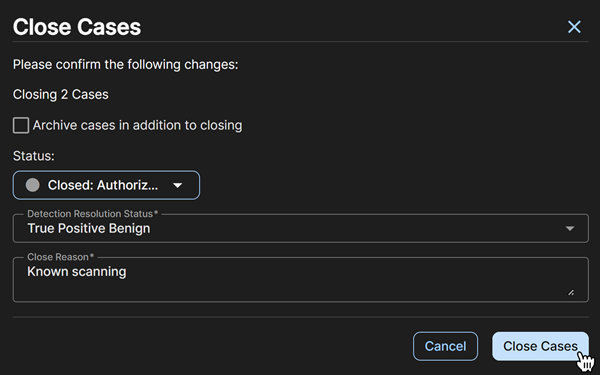
To close multiple cases at once, do as follows:
- On the Cases page, select the checkboxes for the cases you want to close.
- Click Actions and choose Close Selected Cases.
- (Optional) In Close Cases, click the checkbox to also archive the cases while closing.
- Choose the appropriate closed status from the Status drop-down list.
- The detection status updates based on the chosen case closed status. Choose another, if desired.
- Enter a reason for closing the cases.
- Click Close Cases.