Sophos Endpoint Agent for Linux Installation🔗
This guide explains how to install Sophos Endpoint Agent for Linux using the downloaded package or command line. You’ll learn how to prepare your Linux environment, run the installer, use advanced options, and troubleshoot common installation issues.
Prerequisites🔗
Before installation, review the requirements and complete the prerequisite steps in Sophos Endpoint Agent Information and Prerequisites.
Installation🔗
Collect the SophosSetup.sh installer file by following these instructions.
Tip
To download the installer from a command line or script:
- Select the Copy Download URL button to copy the link address.
- On the Linux server, run:
Run the Installer🔗
- Change the file permissions to include execute:
- Run the installer:
Note
By default, Sophos Agent for Linux installs to /opt/sophos-spl. To change the installation directory, use the --install-dir command.
Installer Command-Line Options🔗
Customize the installation by adding environment variables before the installer and command-line options after it.
Environment Variables🔗
| Variable | Values | Description |
|---|---|---|
TMPDIR |
<path to directory> |
Sets a temporary directory for the installer. Use this if /tmp is not executable. |
DEBUG_THIN_INSTALLER |
1 or 0 |
Runs the installer in debug mode. Use this for troubleshooting. |
OVERRIDE_INSTALLER_CLEANUP |
1 or 0 |
Keeps the installer’s temporary files for troubleshooting. |
Tip
Enter environment variables before the installer command. For example:
Basic Command-Line Options🔗
| Option | Description |
|---|---|
--help |
Shows help text. |
--version |
Shows the installer version. |
--force |
Forces installation, even if an existing Sophos product is detected. |
--group=<name> |
Adds the device to a specific group or subgroup in Sophos Fusion. |
--test |
Runs pre-installation checks and prints results without installing. |
--notest |
Installs without running pre-installation checks. |
Advanced Command-Line Options🔗
| Option | Description |
|---|---|
--products=<list> |
Installs only the specified products (antivirus, mdr, xdr). |
--install-dir=<path> |
Installs to a custom directory. |
--user-ids-to-configure=<user:uid,...> |
Sets user IDs for Sophos accounts. |
--group-ids-to-configure=<group:gid,...> |
Sets group IDs for Sophos groups. |
--override-hostname=<name> |
Sets the device name shown in Sophos Fusion. |
--message-relays=<ip:port,...|none> |
Overrides message relays used during installation. |
--update-caches=<ip:port,...|none> |
Overrides update caches used during installation. |
--skip-taegis-tenant-id-check |
Skip check that local Taegis XDR Tenant ID matches one from Sophos Fusion account |
--skip-taegis-uninstall |
Skip uninstall of Taegis Endpoint Agent following successfully installation of Sophos Agent |
--skip-redcloak-uninstall |
Skip uninstall of Red Cloak™ Endpoint Agent following successfully installation of Sophos Agent |
Examples🔗
- Install into a subgroup:
- Set a temporary directory and install to a custom path:
- Run pre-installation checks only:
- Enable debug logging and save output:
Installation in Large, Virtual, or Auto-Scaling Environments🔗
If you manage many Linux devices, virtual machines, or use auto-scaling or load-balancing, consider using the Linux gold image process.
Troubleshooting Common Installation Issues🔗
| Issue | Solution |
|---|---|
Permission denied when running SophosSetup.sh |
Add execute permission:chmod +x SophosSetup.sh |
| “Please run this installer as root” | Run with root privileges:sudo ./SophosSetup.sh |
| “Found an existing installation of SAV…” | Uninstall Sophos Anti-Virus for Linux before installing SPL. |
| Installation fails due to a symlinked directory | Use the actual directory path with --install-dir. |
| Cannot connect to Sophos Fusion | Make sure the device can access the internet and required Sophos domains. |
Pre-installation checks fail due to missing curl |
Install curl and try again. |
Installation fails due to missing setcap |
Install the libcap package:* Debian-based: apt install libcap2-bin* RHEL, CentOS, Amazon Linux: yum install libcap* SLES: zypper install libcap-progs |
| High CPU usage with fapolicyd | Add an allow rule for /opt/sophos-spl/ in /etc/fapolicyd/rules.d/22-sophos.rules. |
| Installation to a custom directory fails | Delete the existing /sophos-spl directory or uninstall SPL, then try again.For SELinux, add a policy for the new directory: semanage fcontext -a -e /opt <path_to_new_directory> |
Tip
For more insight, enable debug logging and review the logs in /opt/sophos-spl/logs/installation.
Log Files🔗
- Component logs:
/opt/sophos-spl/plugins/<plugin name>/log - Installation logs:
/opt/sophos-spl/logs/installation/<component>_install.log - Watchdog log:
/opt/sophos-spl/logs/base/watchdog.log
Validate Installation🔗
Run these commands to validate your Sophos Agent installation:
- Check install
- Version and agent status
- Service status (systemd)
Review Endpoint Agents Summary🔗
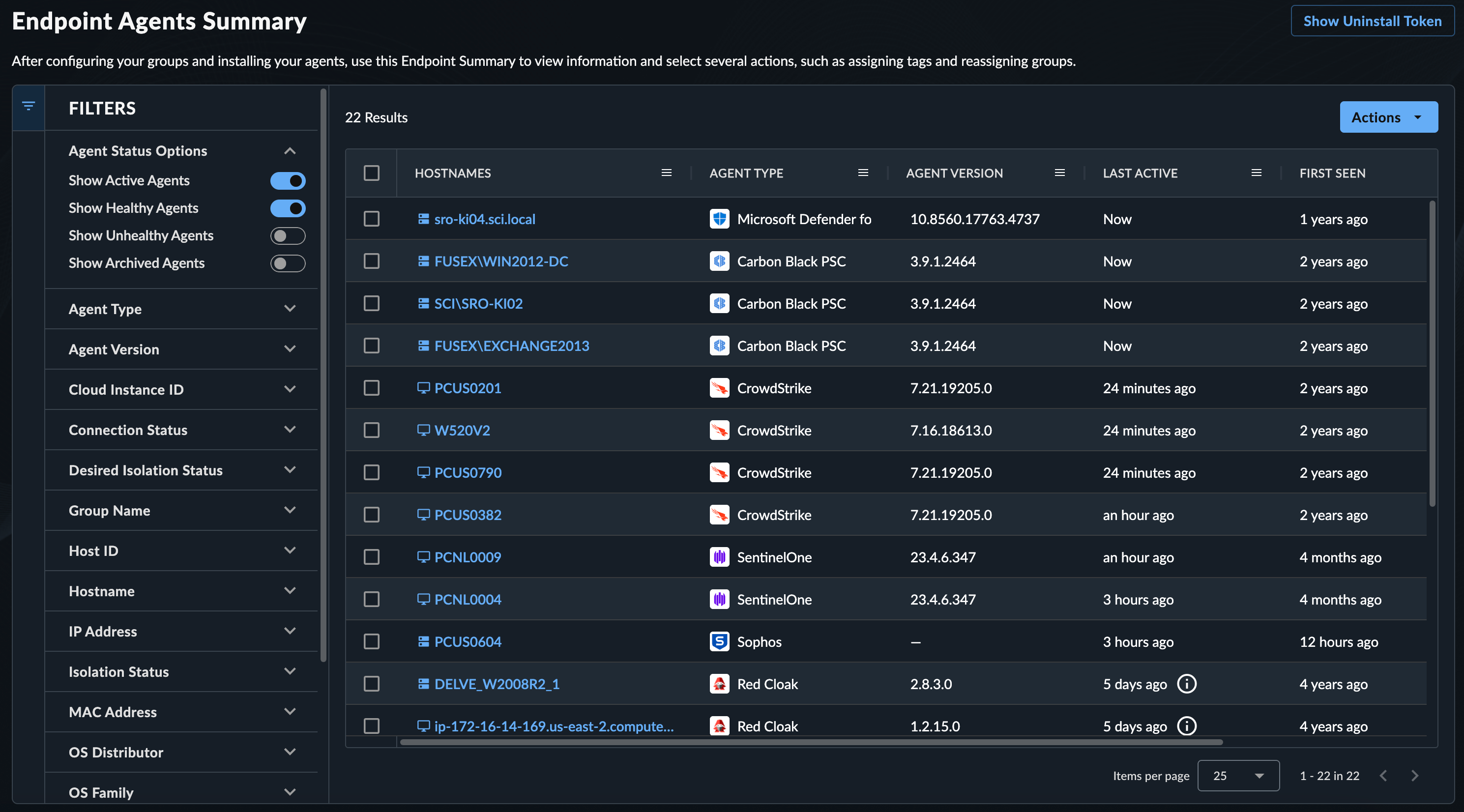
As XDR processes endpoint telemetry, a list of endpoints is generated. Review these by navigating to Endpoint Agents → Summary from the Taegis XDR menu. For more information, see Manage Endpoint Agents.