user management
User Roles
What are the available roles and how should I assign them?
Note
Secureworks recommends you assign users the least-privileged role that allows them to perform their work in order to limit unnecessary access.
Tip
You can now create and manage custom roles using the categories and permissions detailed below to tailor access for your tenant users to your needs. For more information, see Custom Roles .
Administrator
Administrators are the most powerful users in Secureworks® Taegis™ XDR. They can access and use all features of the application, as well as manage users and security telemetry, such as integrations and Secureworks Counter Threat Unit™ (CTU).
Organizational roles well suited to the Administrator role include:
Systems Administrator
Partner/Product Support
Analyst
Analysts are primarily responsible for investigating detections, searching for threats, and recommending response actions. Analysts cannot manage users. Secureworks anticipates that most users would be assigned the Analyst role.
Organizational roles well suited to the Analyst role include:
Security Analyst
Security Manager
Threat Hunter
Responder
Like an Analyst, Responders can investigate detections and search for threats, but they also have the ability to take response actions on a defined set of assets within the tenant.
Organizational roles well suited to the Responder role include:
Incident Response Team Member
SecOps
Threat Hunter
Auditor
Auditors have the most limited access within XDR, as they have read-only access to the application. They can create searches and reports but cannot make changes to the data or their sources.
Organizational roles well suited to the Auditor role include:
Customer Success Manager
Service Delivery Executive
User Role Permissions
Tip
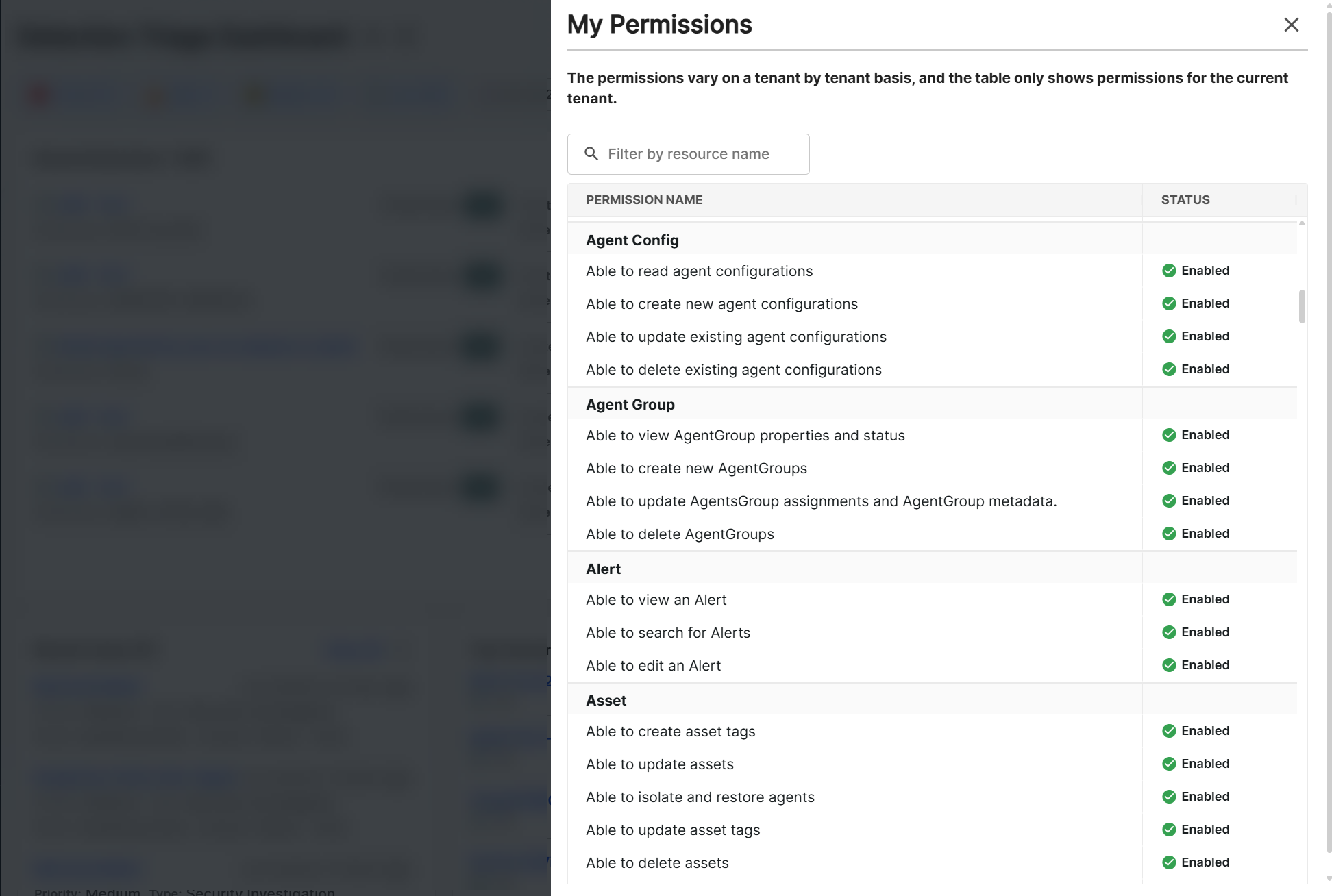
You can press Ctrl + Alt + P on any screen to view your application permissions.
My Permissions Matrix
Agent
Agent
Tenant Admin
Tenant Analyst
Tenant Responder
Tenant Auditor
Block
Download an agent
Isolate agents at a tenant level
Issue reconnect
View agent properties and status
Assign/remove a tag for an agent
Uninstall
Update agent properties
Agent Config
AgentConfig
Tenant Admin
Tenant Analyst
Tenant Responder
Tenant Auditor
Create new agent configurations
Delete existing agent configurations
Read agent configurations
Update
Agent Group
AgentGroup
Tenant Admin
Tenant Analyst
Tenant Responder
Tenant Auditor
Create new agent groups
Delete agent groups
View agent group properties and status
Update agents group assignments and agent group metadata.
Archive Configuration
ArchiveConfiguration
Tenant Admin
Tenant Analyst
Tenant Responder
Tenant Auditor
Create an archive configuration
Delete an archive configuration
View an archive configuration
Asset
Asset
Tenant Admin
Tenant Analyst
Tenant Responder
Tenant Auditor
Create asset tags
Delete assets
Delete asset tags
Update assets
Isolate and integrate agents
Update asset tags
Audit
Audit
Tenant Admin
Tenant Analyst
Tenant Responder
Tenant Auditor
View self-created audit logs
View tenant audit logs with partner user/email info redaction
Case
Case
Tenant Admin
Tenant Analyst
Tenant Responder
Tenant Auditor
Archive a case
Assign a case to the tenant's "customer," ie to any user in the tenant
Assign a case to the tenant's "partner," ie to its parent tenant
Create a new case
Delete a case
Mention a tenant's "partner," ie its parent tenant, in a comment
View a case
Search for a case
Update a case including adding comments, detections and search results
Client
Client
Tenant Admin
Tenant Analyst
Tenant Responder
Tenant Auditor
Create clients
Delete clients
View clients
Update clients
Collector
Collector
Tenant Admin
Tenant Analyst
Tenant Responder
Tenant Auditor
Create a collector
Remove a collector
Download collector files
Download collector endpoint credentials
Read collector properties
Configure a collector
Comments
Tenant Admin
Tenant Analyst
Tenant Responder
Tenant Auditor
Create comments
Delete comments
Read comments
Update comments
Contracted Endpoints
ContractedEndpoints
Tenant Admin
Tenant Analyst
Tenant Responder
Tenant Auditor
Read contracted endpoints infomation
Counter Measures
CounterMeasures
Tenant Admin
Tenant Analyst
Tenant Responder
Tenant Auditor
Download counter measures
View counter measures
Data Source
DataSource
Tenant Admin
Tenant Analyst
Tenant Responder
Tenant Auditor
View data sources
Detection
Detection
Tenant Admin
Tenant Analyst
Tenant Responder
Tenant Auditor
View a detection
Edit a detection
Detection Rules
DetectionRules
Tenant Admin
Tenant Analyst
Tenant Responder
Tenant Auditor
Create a detection rule
Remove a detection rule
Permanently remove a detection rule
Read detection rules
Update a detection rule
Enterprise SSO Connection
Enterprise SSO Connection
Tenant Admin
Tenant Analyst
Tenant Responder
Tenant Auditor
Create enterprise sso connections
Delete enterprise sso connections
Read enterprise sso connections
Update enterprise sso connections
Entity Graph
EntityGraph
Tenant Admin
Tenant Analyst
Tenant Responder
Tenant Auditor
Read schema of properties in entity graph
Write, delete, and update schema of properties in entity graph
File
File
Tenant Admin
Tenant Analyst
Tenant Responder
Tenant Auditor
Download a file
Read a file
Integration
Integration
Tenant Admin
Tenant Analyst
Tenant Responder
Tenant Auditor
Create an integration
Remove an existing integration
Download an integration
View an integration properties and status
Update an integration
Notifications
Notifications
Tenant Admin
Tenant Analyst
Tenant Responder
Tenant Auditor
Create notifications
Delete notifications
Read notifications
Update notifications
Orchestration Action
OrchestrationAction
Tenant Admin
Tenant Analyst
Tenant Responder
Tenant Auditor
Able trigger actions from cases
Lookup contextual information
Trigger remediation response actions
Orchestration Connection
OrchestrationConnection
Tenant Admin
Tenant Analyst
Tenant Responder
Tenant Auditor
Create an orchestration connection
Remove an orchestration connection
View an orchestration connection properties and status
Modify an orchestration connection
Orchestration Connection Method
OrchestrationConnectionMethod
Tenant Admin
Tenant Analyst
Tenant Responder
Tenant Auditor
View an orchestration connection method properties and status
Orchestration Connector
OrchestrationConnector
Tenant Admin
Tenant Analyst
Tenant Responder
Tenant Auditor
Create an orchestration connector
Remove an orchestration connector
View an orchestration connector properties and status
Modify an orchestration connector
Partner Tenant
PartnerTenant
Tenant Admin
Tenant Analyst
Tenant Responder
Tenant Auditor
Read partner tenant information (subscriptions, partner relationships)
Update partner tenant information (subscriptions, partner relationships)
Playbook
Playbook
Tenant Admin
Tenant Analyst
Tenant Responder
Tenant Auditor
Create a playbook
Delete playbook properties
Execute a playbook
View playbook properties and results
Modify playbook properties
Playbook Instance
PlaybookInstance
Tenant Admin
Tenant Analyst
Tenant Responder
Tenant Auditor
Create a playbook instance
Delete a playbook instance
Execute a playbook instance
View a playbook instance properties, executions and results
Modify a playbook instance
Report
Report
Tenant Admin
Tenant Analyst
Tenant Responder
Tenant Auditor
Create a report
Delete an existing report
View a report
View all reports within the tenant env if those reports are marked as 'share with admin'
Edit an existing report
Search
Search
Tenant Admin
Tenant Analyst
Tenant Responder
Tenant Auditor
Create and save a search
Remove an existing search
View search results
Update and existing search
Delete personal searches
Tenant
Tenant
Tenant Admin
Tenant Analyst
Tenant Responder
Tenant Auditor
Create a tenant
Read tenant properties
Update a tenant
Tenant Preference
TenantPreference
Tenant Admin
Tenant Analyst
Tenant Responder
Tenant Auditor
Create a tenant preference
Delete a tenant preference
Read a tenant preference
Update a tenant preference
Tenant Profile
TenantProfile
Tenant Admin
Tenant Analyst
Tenant Responder
Tenant Auditor
Create a tenant profile
Read a tenant profile
Notification Configs CSE Contact
Tenant Admin
Tenant Analyst
Tenant Responder
Tenant Auditor
Create Notification Configs CSE contacts
Remove Notification Configs CSE contacts
Read Notification Configs CSE contacts
Update Notification Configs CSE contacts
Notification Configs Health Contact
Tenant Admin
Tenant Analyst
Tenant Responder
Tenant Auditor
Create Notification Configs health contacts
Remove Notification Configs health contacts
Read Notification Configs health contacts
Update Notification Configs health contacts
Tenant Profile Network Info
TenantProfileNetworkInfo
Tenant Admin
Tenant Analyst
Tenant Responder
Tenant Auditor
Create tenant profile network information
Remove tenant profile network information
Read tenant profile network information
Update tenant profile network information
Tenant Profile Network Range
TenantProfileNetworkRange
Tenant Admin
Tenant Analyst
Tenant Responder
Tenant Auditor
Create tenant profile network range
Remove tenant profile network range
Read tenant profile network range
Update tenant profile network range
User
User
Tenant Admin
Tenant Analyst
Tenant Responder
Tenant Auditor
Invite a user to a tenant
Create a pre registered user
Deactivate a user
Read a user
Update a user's properties including assigned access roles