Sophos Endpoint Agent Introduction🔗
Deploying Sophos Endpoint Agent on your endpoints and servers equips your organization with both advanced endpoint protection (EPP) and endpoint detection and response (EDR) capabilities. For optimal security, we recommend installing the full Detection and Protection (EPP+EDR) agent mode.
Refer to the following documents and Knowledge Base articles for comprehensive guidance on installation, agent management, and troubleshooting.
- Upgrade to Sophos Endpoint Agent
- Sophos Agent Setup
- Manage Agents in XDR
- Uninstall Agents
- Find technical specifications, FAQs, release notes, and more information
Upgrade to Sophos Endpoint Agent🔗
Important
In Secureworks® Taegis™ XDR, Sophos Endpoint Agent refers to the Sophos Agent in both Detection and Protection and Detection Only modes, unless specified otherwise.
With your Secureworks® Taegis™ XDR license, you can deploy the Sophos Agent in either Detection and Protection (EPP+EDR) or Detection Only (EDR) mode across your organization. Sophos Agent offers an upgrade from Taegis Endpoint Agent, especially with the enhanced protective controls available in the Detection and Protection version.
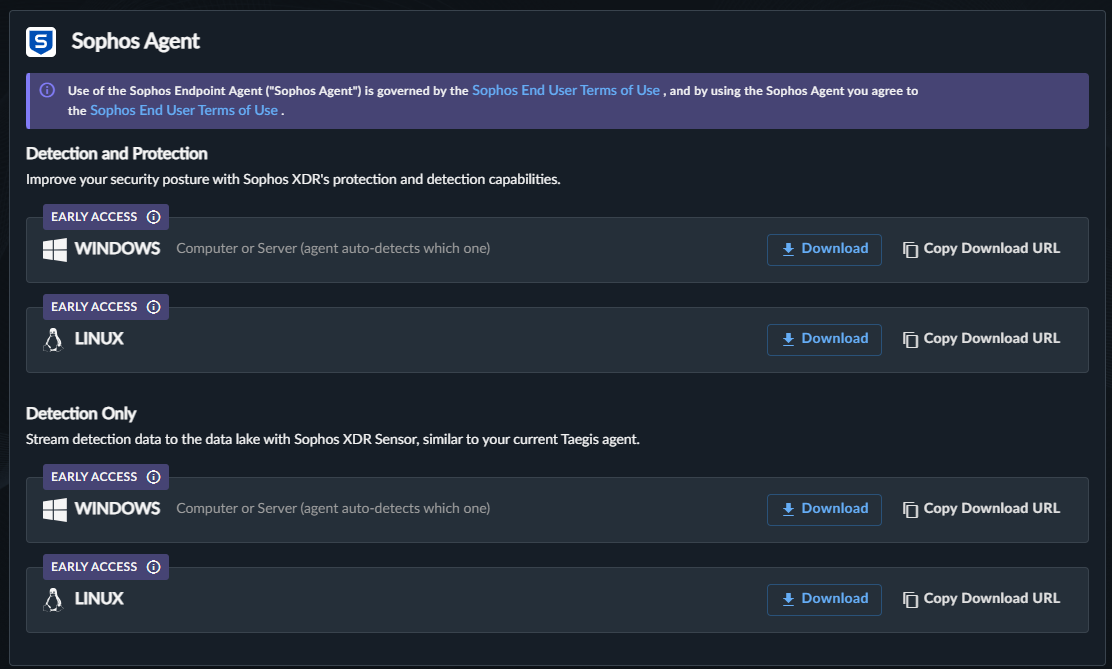
Sophos Agent Detection Only mode provides detection capabilities equivalent to Taegis Endpoint Agent, ensuring consistent visibility and threat detection across both offerings. It also includes Live Response, enabling analysts to connect directly to devices from within Sophos Fusion to examine and remediate potential security issues in real time.
The table below presents a comparison of agent capabilities:
| EDR Category | Red Cloak™ Endpoint Agent | Taegis Endpoint Agent | Sophos Agent Detection Only | Sophos Agent Detection and Protection |
|---|---|---|---|---|
| Event and Detection Data | ✓ | ✓ | ✓ | ✓ |
| Host Isolation | ✓ | ✓ | ✓ | ✓ |
| Live Response | ✓ | ✓ | ||
| Anti Malware Scan Interface (AMSI) | ✓ | ✓ | ✓ | |
| Threat Surface Reduction (Web Control, Application Control, Peripheral Control, DLP) | ✓ | |||
| Threat Prevention (Web Protection, Machine Learning, Behavioral, Anti-exploit, Anti-ransomware) | ✓ |
If your organization already uses a different Endpoint Protection Platform (EPP), you can deploy Sophos Agent Detection Only for a practical upgrade path. You can choose to add or remove the Sophos protection capabilities at any time without needing to reinstall the agent software.
Important
If you encounter issues or have specific requirements that cannot be addressed with Sophos Agent, you can revert to your previous endpoint solution. Common reasons for you to revert include:
- Compatibility issues with certain applications or systems
- Organizational policies or compliance requirements that mandate the previous agent
- Unresolved technical issues or bugs encountered during deployment or operation
- The need for features or workflows that are currently only available in the previous agent
If you choose to revert, ensure you follow the recommended uninstall and reinstall procedures for a smooth transition. For further guidance, consult the Knowledge Base or contact support.
Upgrade from Red Cloak or Taegis to Sophos Endpoint Agent🔗
For guidance on upgrading to Sophos Agent, refer to the Knowledge Base article: Guide: Upgrade to Sophos Endpoint Agent.
Additionally, Secureworks has provided an agent upgrade PowerShell script intended to support customers moving to Sophos Agent from legacy endpoint agents. Customers are encouraged to leverage this script for new Windows deployments. The script is dynamic and can recognize if Red Cloak Endpoint Agent or Taegis Endpoint Agent removal is needed or not. For more information, see Sophos Endpoint Agent for Windows Installation.
Agent Deployment🔗
Tip
Before deploying Sophos Agent in your organization, it's best practice to test the agent software on a group of test endpoints.
Sophos Agent Setup🔗
When you have access to your XDR tenant, you can start using Sophos Agent. You can also access Sophos Fusion through single sign-on (SSO) directly from your XDR tenant.
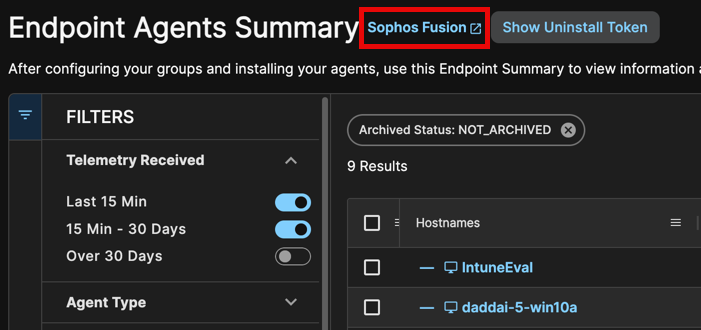
Access Sophos Fusion from various links throughout your XDR tenant. The easiest way is to use the Taegis Menu to navigate to Endpoint Agents > Summary, then select the Sophos Fusion link next to the page title. Note that the active tenant in Taegis must be a customer tenant in Sophos Fusion for this route to work.
Note
When you access Sophos Fusion via SSO from your Secureworks® Taegis™ XDR tenant, your user account role maps to specific permissions in Sophos Fusion. For details, see the user role mappings documentation.
To configure and install Sophos Endpoint Agent, follow these steps:
Recommended Optional Configurations in Sophos Fusion🔗
-
Use Device Groups and People Groups to group devices (Computers and Servers) and users for management. These can be defined manually, or you can use directory synchronization to reduce administrative overhead.
Note
Devices and users are not required to be in a group configuration, and their policies can be configured individually.
-
Explore the different Group Policy types you can configure. Many protection-focused policies apply only to Sophos Agent, while the Update Management Policy also supports Sophos Agent Detection Only endpoints. Use Update Management to control which software versions run on your endpoints and to schedule update times.
- Create the necessary custom group policies and assign them to the appropriate Device and User Groups. Alternatively, use the default base policies to provide recommended protection for all devices and users.
- Identify environments where endpoints may not have direct internet access and consider deploying Update Caches and Message Relays.
- Isolated hosts may need limited and authorized access for remote troubleshooting or downloading cleanup tools. Configure Isolation Exceptions in Sophos Fusion for these scenarios.
Download and Deploy Sophos Agent🔗
-
Go to Agent Downloads to download the necessary Sophos Agent installation package.
-
Before starting the installation process, verify the following:
- Network controls support the network requirements for Sophos Agent.
- Target machines run a supported OS for Sophos Agent.
- Target machines meet the recommended system requirements for Sophos Agent.
-
Once you fulfill the preceding points, refer to the relevant documentation for your platform for guidance on installing Sophos Agent on your system.
Larger Deployments🔗
The Knowledge Base contains several articles supporting new Sophos Agent deployments and installation via MDM (Mobile Device Management) tools such as MECM (SCCM), Intune, and Jamf Pro. See the following articles if you're distributing Sophos Agent software using MDM tools:
-
Windows
-
macOS
After the installation process, review Manage Endpoint Agents. Use this information to understand how to navigate and manage the Endpoint Agents Summary in XDR, and validate that deployed and installed agents are reporting into your tenant.
Manage Agents in XDR🔗
Tag Endpoints🔗
Note
When you upgrade a device to Sophos Agent, it will maintain a copy of the tags from the legacy agent entry.
Tagging endpoints provides context to your endpoints in XDR. This information can be used to filter your view of endpoints by specific tags or as criteria for executing an Automations Action, for example.
To add or remove a tag individually or in bulk in XDR, see Add and Remove Endpoint Tags.
Create Agent Host Isolation and Restore Actions🔗
XDR can isolate and restore hosts installed with Sophos Agent, preventing them from communicating within or outside the network environment. You can quickly react to situations where you consider endpoints compromised by using the Automations capabilities within XDR.
Isolating or restoring hosts running Sophos Agent requires defining Automations Actions. The following article explains the configuration and operation of isolation actions: How To: Configure Taegis Actions - Isolate Host.
Live Response🔗
Live Response enables you to connect directly to Sophos Agent devices for real-time triage and remediation of security issues. By default, Live Response is disabled for Sophos Agent. For more details, see Live Response.
Live Endpoint Search (Live Discover)🔗
Note
Live Endpoint Search is called Live Discover in Sophos Fusion.
Live Endpoint Search is a Sophos Fusion feature that allows you to check the devices that Sophos Fusion is managing, look for signs of a threat, or assess compliance. After installing the Sophos Agent, you can quickly access Live Endpoint Search from the Taegis Menu under Advanced Search > Live Endpoint Search.
For more information, see the Sophos Live Discover documentation.
Archive or Unarchive Agents🔗
If you want to remove agent entries that you see in the Endpoint Agent Summary table, such as agents that you have uninstalled, you can archive them.
See Filter Endpoint Agents Summary Table to understand how to filter by various criteria, including archived status.
Note
You cannot permanently remove agents from XDR.
Archive and unarchive agents manually in XDR by following Archive and Unarchive Selected Endpoints.
Note
Archived agents that continue to send telemetry to XDR are automatically unarchived. When an agent is initially archived, a brief grace period is provided before unarchiving occurs if the agent continues to send telemetry.
Uninstall Agents🔗
To uninstall Sophos Agent and remove them from the endpoint or system, see Uninstall Sophos Endpoint Agent.
More Information🔗
Technical Information and Sophos Agent Specifications🔗
- Sophos Agent technical details are available in Sophos Endpoint Agent Technical Details.
- The FAQ for Sophos Agent is available in FAQ: Sophos Endpoint Agent.
Release Notes for Sophos Agent🔗
- Review upgrade information for each Sophos Agent version in Sophos Release Notes.
- Find release information for XDR in the Release Notes.