CEL Explorer🔗
XDR supports the use of Google’s Common Expression Language (CEL) in multiple areas:
- In Automations connectors, playbook inputs, playbook triggers, and templates to enable embedding logic and data manipulation.
- In Auto Case templates and rules to refine configuration.
CEL Explorer lets you test CEL expressions against a specific type of input so that you can see the outcome of the expression. The following input resource types are supported:
- Detection
- Endpoint Asset
- Entity
- Case
- Playbook Execution
Enter a share link to an instance of one of the supported resource types in the Resource ID field to show and use the object's data while you build your CEL statement.
Get to CEL Explorer🔗

Access CEL Explorer in multiple ways:
- From the Taegis Menu, select Tools > CEL Explorer.
-
From the details page of a detection, endpoint asset, entity, case, or playbook execution, select the Actions menu and choose View in CEL Explorer.

CEL Explorer
Tip
When you access CEL Explorer from a details page, the resource type and ID are automatically set to the associated input.
CEL Explore Autocomplete🔗
CEL Explorer provides context-aware autocomplete for CEL macros, filtered by your chosen resource type. As you type, it suggests macros relevant to the resource type and lets you insert them directly into your expression.
Note
If you select Use Raw Input, macros for all resource types are suggested.
To use autocomplete, do as follows:
- Start typing in the CEL Expression field to see suggestions.
-
Click a macro to insert it into your expression.
You can also use the Down arrow key to highlight a macro and then Tab to insert it.
Tip
While a macro is highlighted, click the arrow at the end of the macro to see more details.
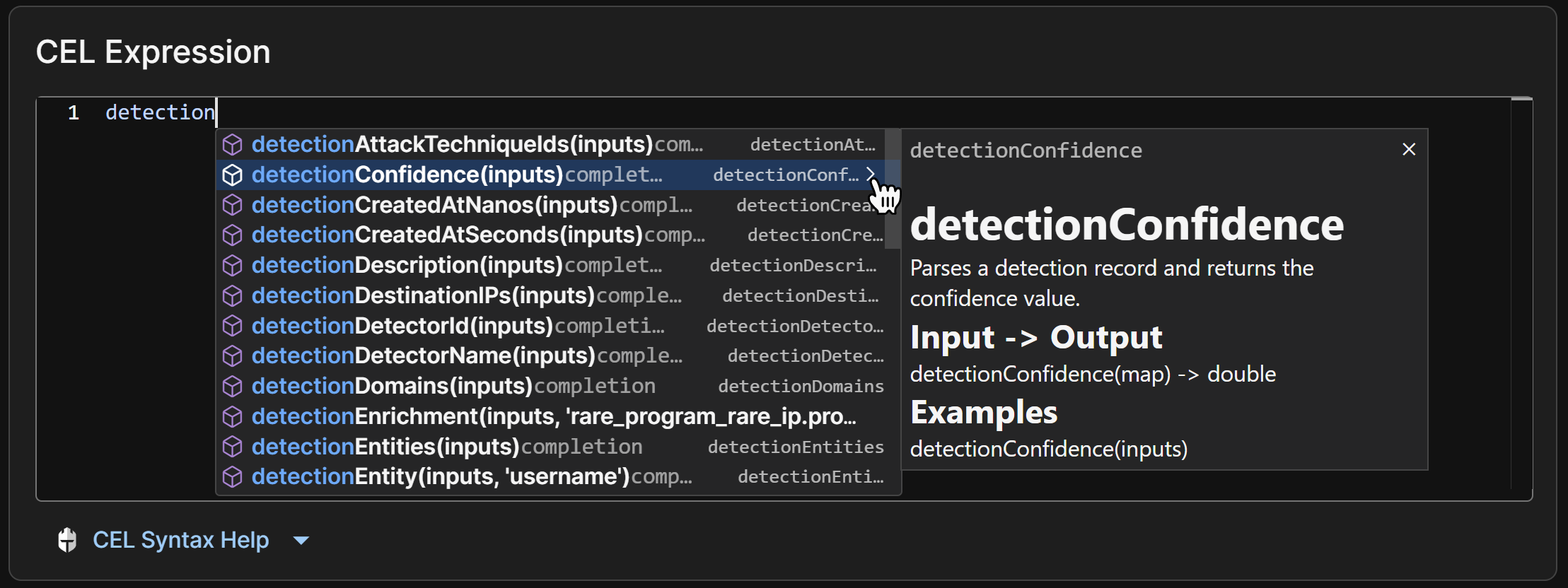
CEL Explorer Autocomplete
Use CEL Explorer🔗
To evaluate the outcome of a CEL expression, follow these steps:
- Select the desired Resource Type from the dropdown menu.
-
Paste the share link to the instance of the input you would like to test your expression against in the Resource ID field.
Tip
When you access CEL Explorer from a details page, the resource type and ID are automatically set to the associated input. Find a share link from the details page of the desired detection, endpoint asset, case, or playbook execution. Entities do not include a share link; select View in CEL Explorer from the Actions menu of an entity instead.
-
Paste or enter the CEL expression you would like to test in the CEL Expression field. As you type, macros relevant to the chosen resource are suggested. See CEL Explore Autocomplete for details.
Tip
See Additional Resources for help with CEL, supported macros, and examples.
-
Click Run to evaluate your CEL expression against the input.