Box Integration Guide🔗
The following instructions are for configuring a Box integration to facilitate log ingestion into Secureworks® Taegis™ XDR.
Data Provided from Integration🔗
Important
To receive Box Shield alerts, your organization must have an active Box Shield subscription and have the feature enabled.
| Normalized Data | Out-of-the-Box Detections | Vendor-Specific Detections | |
|---|---|---|---|
| Box | Auth, CloudAudit, Thirdparty |
Note
XDR detectors are not guaranteed to be triggered, even if a data source's logs are normalized to a schema associated with a given detector. However, you can create Custom Detection Rules to generate detections based on normalized data from a data source.
Prerequisites🔗
- A Box user account with permissions to create and authorize a Custom App in your Box enterprise. Refer to Box's documentation for the specific roles required.
Configure Box🔗
Information Required to Complete Integration🔗
- Enterprise ID — Your organization's unique Box instance identifier
- Client ID — Custom App’s ID
- Client Secret — Custom App’s Secret
Create a Custom App🔗
- Log into the Box Developer Console.
- Click My Platform Apps, then click Create Platform App in the top right.
- Click the Custom App card.
- Reference the vendor’s documentation to create a Custom App. Enter the following values:
- App Name: A descriptive string.
- Purpose: Choose the applicable value.
- Choose the Server Authentication (with Client Credentials Grant) authentication method.
- Click the Create App button.
App Authorization🔗
- Go to the Authorization tab for your application within the Developer Console.
- Click Review and Submit to send an email to your Box enterprise Admin for approval.
Basic Configuration🔗
- Under the App access level section, choose App + Enterprise Access.
- Under the Application Scopes section, choose Manage Enterprise Properties. For more information, see Manage enterprise properties.
- Go to the General Settings tab and copy the Enterprise ID for use in a later step.
- Go to the Configuration tab and copy the Client ID and Client Secret from the OAuth 2.0 credentials section for use in a later step. Click Fetch Client Secret to show the Client Secret.
Add Integration in XDR🔗
- From the Taegis Menu, select Integrations → Cloud APIs.
- Select Add an Integration from the top of the page.
-
From the Optimized tab, select Box.
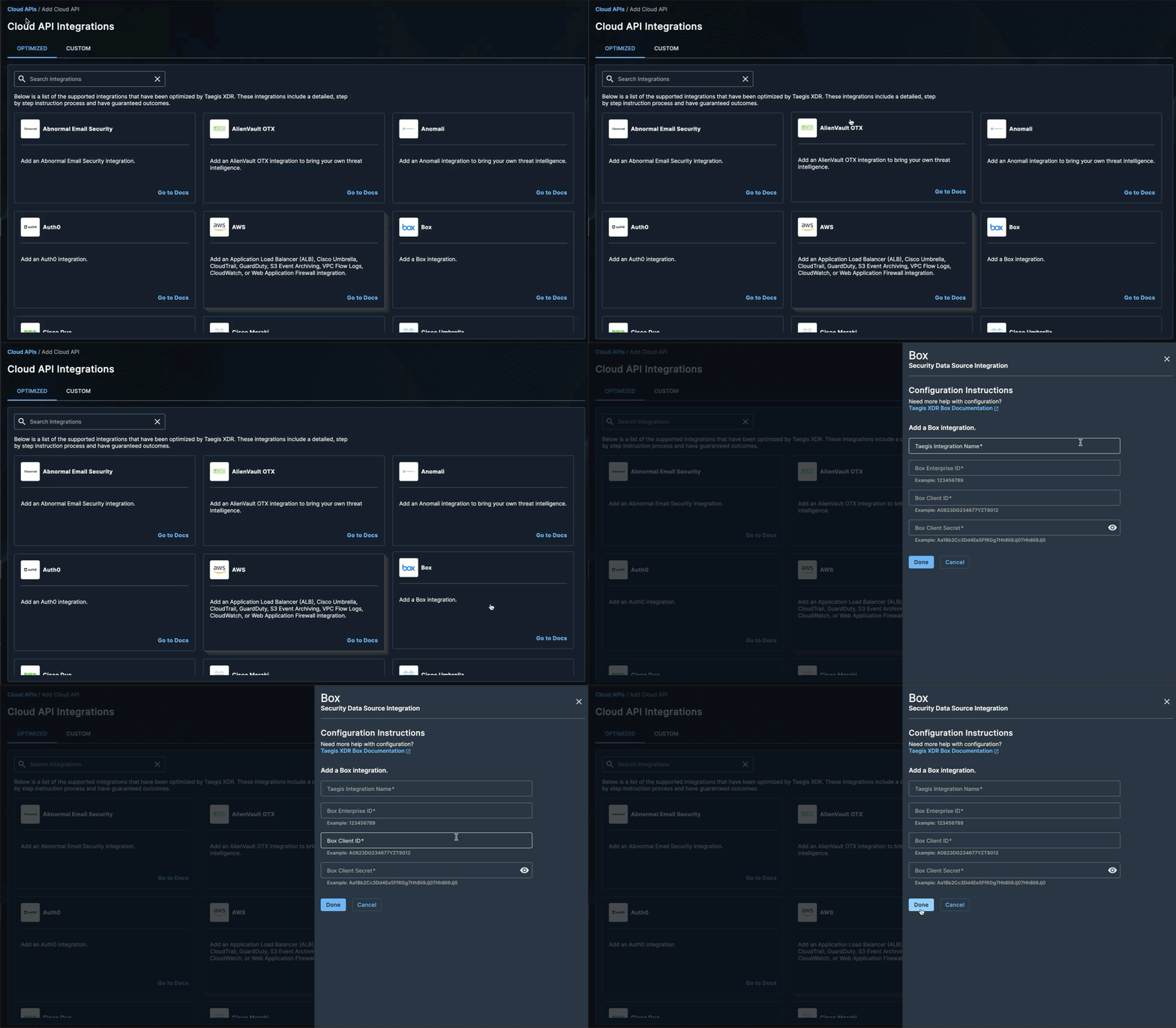
Create a New Box integration -
Enter the following values:
- Taegis Integration Name — This serves as a unique name for your integration, which can include any valid values up to 100 characters.
- Box Enterprise ID
- Box Client ID
- Box Client Secret
-
Select Done. The Cloud API Integrations page displays the successfully added Box integration.