Skip to content

Configure HTTP Ingest🔗

The following instructions are for configuring the Secureworks® Taegis™ XDR HTTP Ingest to facilitate ingestion from data sources that can send logs to an HTTP server.

  1. From the Taegis Menu, select Integrations → Cloud APIs.

  2. Select Add an Integration from the top of the page.

    Add an Integration

  3. Choose the Custom tab and select Set Up from the HTTP Ingest card.

  4. Enter a name for the integration, then select Done.

    HTTP Ingest Integration

  5. Copy the Integration Key and URL.

    Important

    Ensure that you save the Integration Key and URL as these will not be available after this dialog box is closed.
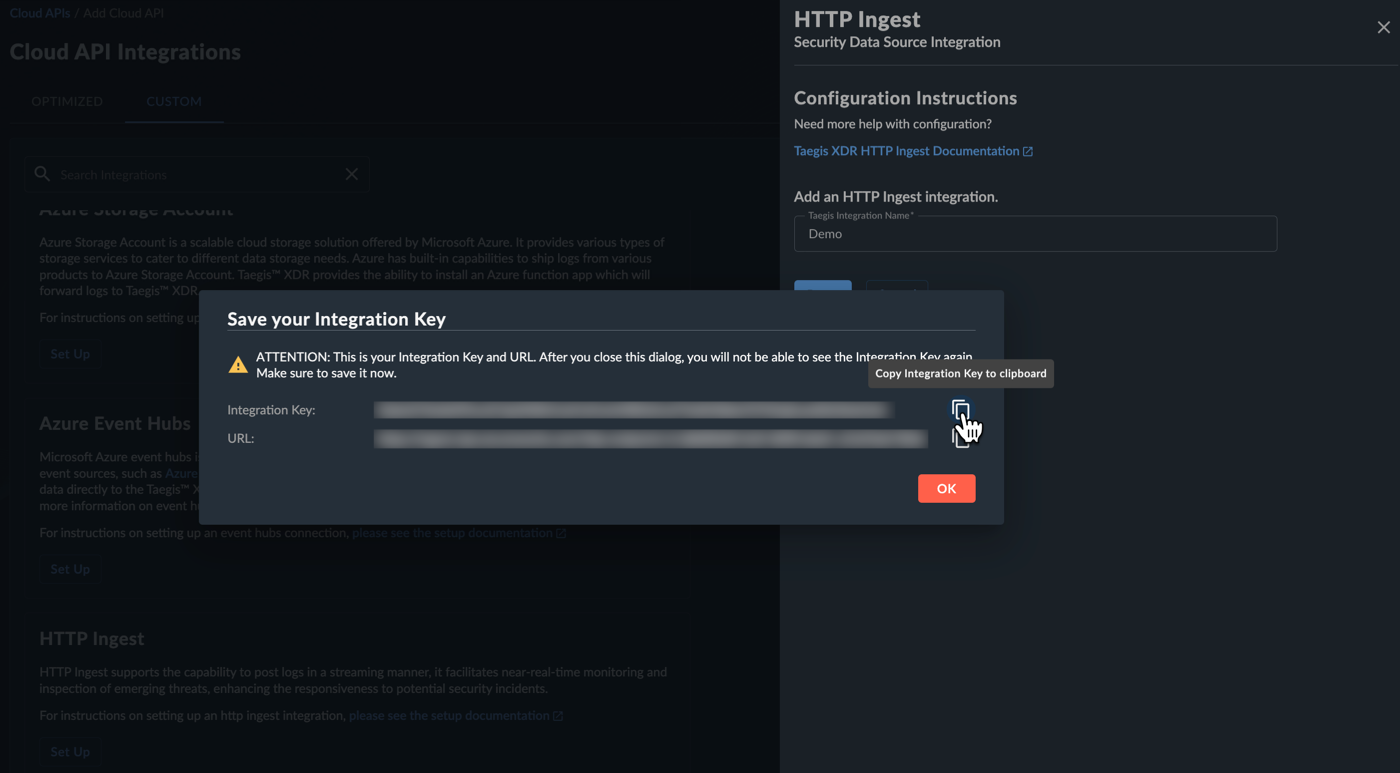
    Copy HTTP Ingest Integration Key and URL

  6. Select OK. The HTTP Ingest integration displays in the Cloud API Integrations table.

  7. Configure your data source(s) to send logs to an HTTPS server using the Integration Key and URL copied from XDR in Step 4.

Examples🔗

The following are examples of scripts that send the contents of a file to a configured XDR HTTP Ingest integration.

Python🔗

Set the HTTP_URL and ACCESS_TOKEN environment variables before running the Python script.

export HTTP_URL="your_http_ingest_url"
export ACCESS_TOKEN="your_access_token"
#!/usr/bin/env python

import requests
import os
from os import sys

def upload_file(url,token,filename):
    contents = ""
    if os.path.exists(filename):
        content_length = os.path.getsize(filename)
        try:
            with open(filename,"rb") as fd:
                contents = fd.read()
        except OSError as err:
            print("OS error: {0}".format(err))
            sys.exit(2)
    else:
        print("The file does not exist")
        sys.exit(2)

    # Set the headers for the request
    headers = {}
    if "{" in contents.decode(encoding='UTF-8',errors='strict'):
        headers["Content-Type"] = "application/json"
    else:
        headers["Content-Type"] = "text/plain"

    headers['Authorization'] = 'Bearer ' + token

    # Send the POST request with the data
    response = requests.post(url, data=contents, headers=headers)

    if response.status_code == 200:
        print("Upload success of file {0}".format(filename))
    elif response.status_code == 403:
        print("Unauthorized access credentials provided, please check your token and url for accuracy.")
    else:
        print("Upload failed with error {0}".format(response.text))

if __name__ == "__main__":
    token = os.environ.get('ACCESS_TOKEN')
    url = os.environ.get("HTTP_URL")
    filename = sys.argv[1]
    upload_file(url,token,filename)

cURL🔗

#!/bin/bash

#Set the HTTP_URL and ACCESS_TOKEN environment variables before running the Bash script.

export HTTP_URL="your_http_ingest_url"
export ACCESS_TOKEN="your_access_token"

# URL and Bearer token environment variables

url=$HTTP_URL
token=$ACCESS_TOKEN

# File to read

filename="$1"

# Perform a POST request with JSON data

echo "Performing POST request to $url"

response_code=$(curl $url -o /dev/null -w "%{http_code}" -H "Authorization: Bearer $token" --data-binary @$filename)

if [[ $response_code -eq 200 ]]; then
    echo "Request successful"
else
    echo "Request failed with response code $response_code"
fi