Integration Event Time and Time Zone Handling🔗
Secureworks® Taegis™ XDR normalizes all ingested log events to a common timeline by assigning each event a single event time. This guide explains how the platform determines an event's time from integration logs, how included or excluded time zones affect that value, and what to do when event timestamps look incorrect.
Key Concepts🔗
- Unified event time: XDR assigns every event a single canonical timestamp stored as
event_time_usec(microseconds since epoch). This value is used for searches, timelines, and correlation. - Time zone awareness: If a parsed timestamp includes a time zone or offset (for example,
Zor+/-HH:MM), XDR interprets it accordingly. If no time zone is present, XDR assumes the timestamp is UTC. - Best practice: Configure sources to emit timestamps with an explicit offset or in UTC. If vendors change formats or add offsets, open a support ticket with samples so parsers can be updated.
What Is Event Time?🔗
In XDR, event time represents when an event occurred and is stored in the normalized field event_time_usec. This is the timestamp used whenever you filter by time or view events on timelines.
A related field, ingest_time_usec, represents when the platform received the log. Ingestion time is used only as a fallback when no usable timestamp can be extracted from the log itself.
How XDR Determines Event Time🔗
Event time is selected by integration-specific parsers. While details vary by integration, the general precedence is:
-
Syslog header timestamp: When the log arrives via syslog, the initial parser extracts the syslog header timestamp first.
- Classic RFC 3164 headers include date/time without a time zone.
- RFC 5424 headers may include a time zone or offset and are honored where supported.
-
Vendor-provided timestamp (overrides syslog header): If the log includes a recognized timestamp field (for example,
event_time,timestamp, or CEFrt), a child parser can use this instead. - Ingestion time (fallback): If no usable timestamp exists, XDR uses
ingest_time_usec.
These scenarios can be summarized as follows:
| Log scenario | Event time used by XDR |
|---|---|
| Syslog header present | Syslog header timestamp |
| Vendor timestamp present | Parsed vendor timestamp |
| No timestamp at all | Ingestion time |
Time Zones and Naive Timestamps🔗
- Explicit time zone or offset present: XDR converts the timestamp to UTC using the provided offset.
- No time zone or offset (naive timestamp): XDR cannot infer the device's local time zone and therefore assumes UTC.
Why Events May Appear Wrong🔗
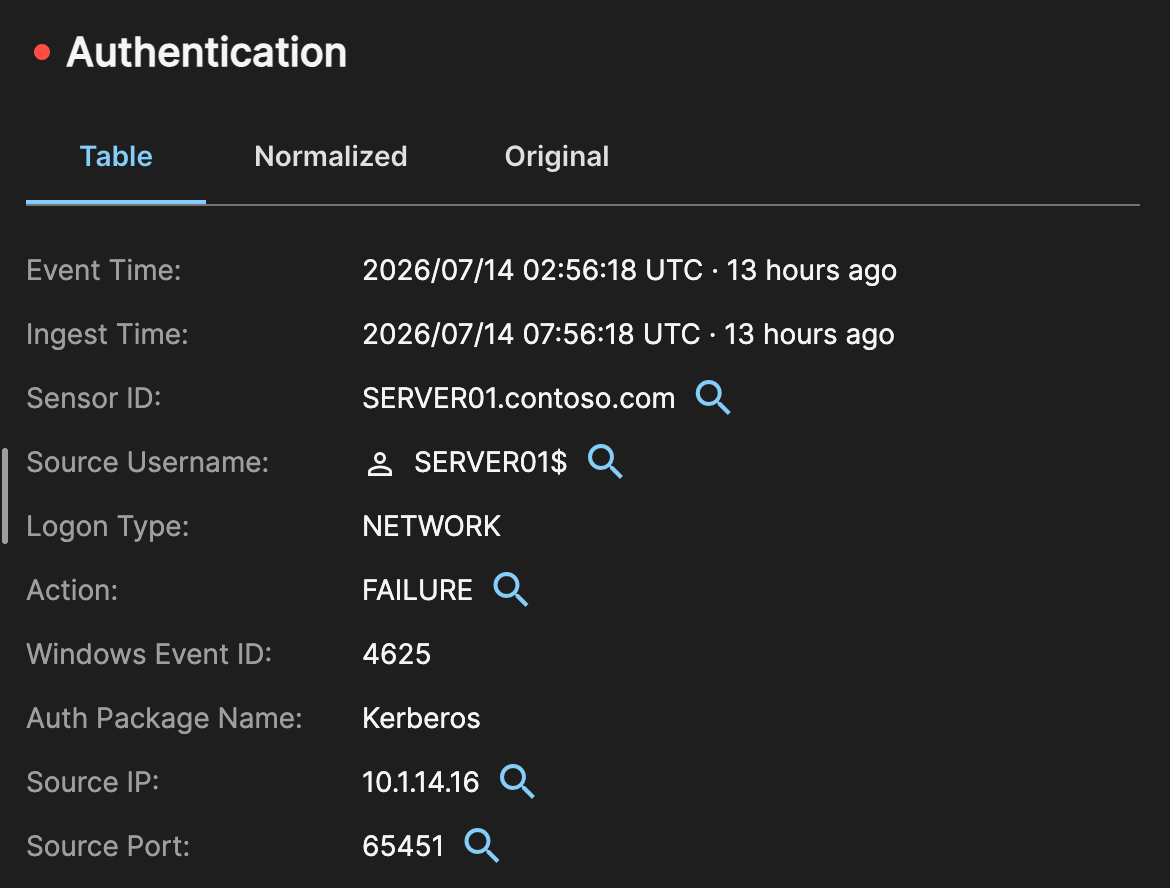
If a device logs local time without a time zone, XDR assumes UTC. This commonly results in events appearing consistently shifted by the difference of hours between the local time and UTC. This behavior is expected when time zone information is missing and is not a parser error.
Example
The following is an example log and event with a five hour offset resulting in a gap shown for the event and ingest times:
Jul 14 07:56:18 10.1.0.32 Jul 14 02:56:18 10.1.9.10 Jul 14 02:56:18 SERVER01 07/14/2026 02:56:18 AM LogName=Security SourceName=Microsoft Windows security auditing. EventCode=4625 EventType=0 Type=Information ComputerName=SERVER01.contoso.com TaskCategory=Logon OpCode=Info RecordNumber=12345680 Keywords=Audit Failure Message=An account failed to log on. Subject: Security ID: S-1-5-18 Account Name: SERVER01$ Account Domain: CONTOSO Logon ID: 0x3E7 Logon Type: 3 Account For Which Logon Failed: Security ID: S-1-0-0 Account Name: Account Domain: Failure Information: Failure Reason: Unknown user name or bad password. Status: 0xC000006D Sub Status: 0xC0000064 Process Information: Caller Process ID: 0x4ac Caller Process Name: C:\Windows\System32\lsass.exe Network Information: Workstation Name: SERVER01 Source Network Address: 10.1.14.16 Source Port: 65451 Detailed Authentication Information: Logon Process: Schannel Authentication Package: Kerberos Transited Services: - Package Name (NTLM only): - Key Length: 0
How to Ensure Correct Event Times🔗
- Prefer RFC 3339 timestamps: Configure sources to emit timestamps in RFC 3339 / ISO 8601 format with an explicit offset or Z for UTC (for example, 2024-03-15T14:22:00+02:00 or 2024-03-15T14:22:00Z). This is also the format required by RFC 5424 syslog.
- Otherwise, use UTC: If offsets are not available, configure the source or forwarder to log in UTC.
- Use capable forwarders: Some agents such as syslog forwarders can normalize timestamps to UTC or add offsets.
- Report vendor changes: If a vendor adds offsets, changes formats, or introduces a better timestamp field, open a support ticket with sample logs and vendor documentation so parsers can be updated.
Summary🔗
- XDR assigns a single canonical event time to every event.
- Parsers prefer vendor timestamps, then syslog headers, and finally ingestion time.
- Time zones matter: Missing time zone information leads to a UTC assumption.
- Configure sources to include offsets or use UTC to avoid consistent time shifts.
- Share vendor changes and samples to improve parser accuracy.