Non-Human Identity Details🔗
Non-human identity (NHI) details show information collected from your identity provider about the NHIs registered in your tenant, including Enterprise Applications, other service principals, and Microsoft Entra Agent ID objects.
For background information about Microsoft Entra Agent ID objects and how they're related, see Understanding Agent ID Concepts.
To see NHI details, click a Display Name in the Non-Human Identities view of the Directory page.
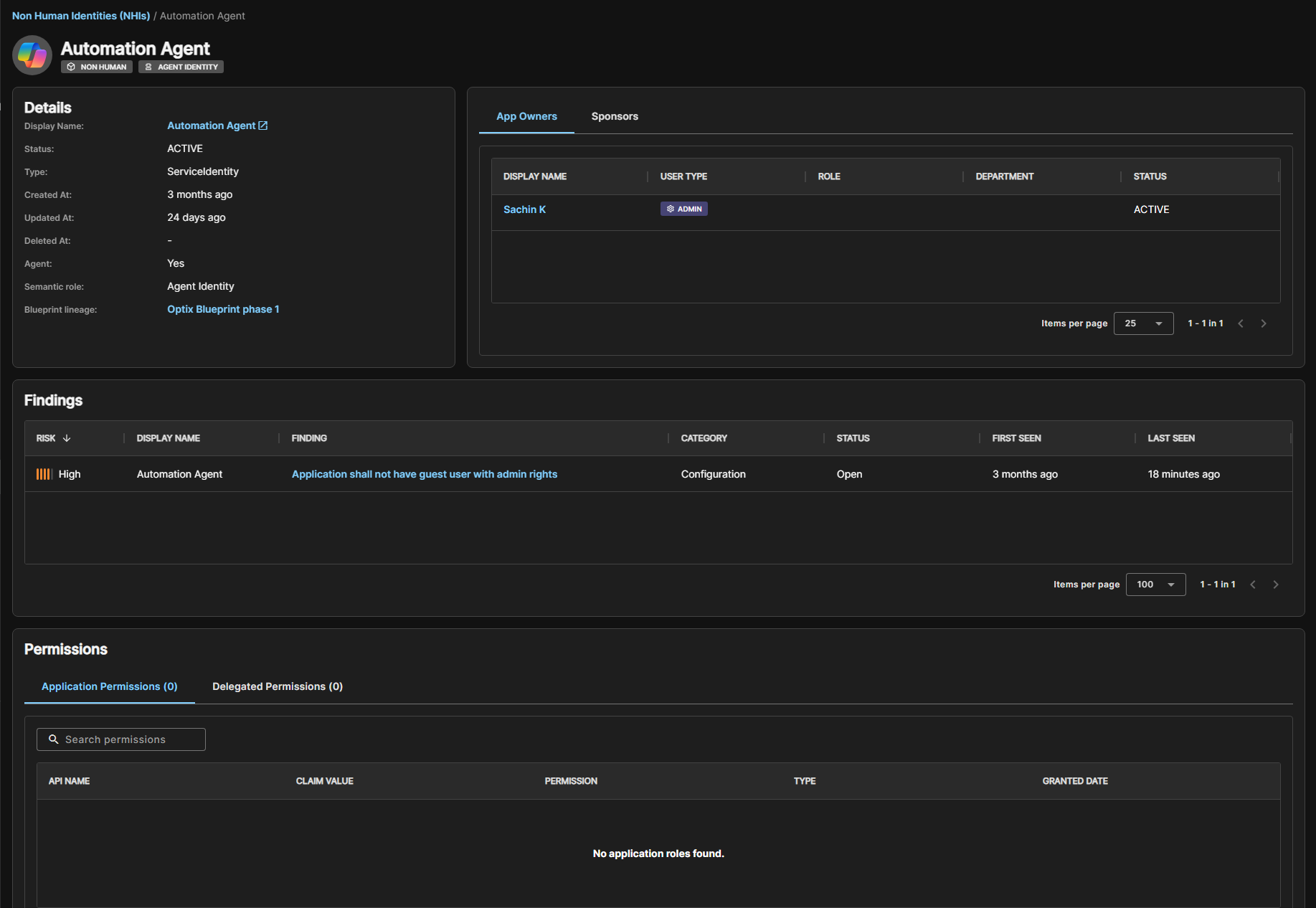
Details🔗
The Details section shows information about the NHI as available from your Microsoft Entra ID environment:
- Display Name: The name of the object, linked to the object in the Microsoft Entra admin center.
- Status: Whether the object is active, disabled, or deleted.
- Type: The underlying Resource Type, such as Application or ServiceIdentity.
- Created At, Updated At, and Deleted At: Timestamps for the object's lifecycle.
For objects classified as an agent identity or agent identity blueprint principal, the Details section also shows:
- Agent:
Yes, indicating the object is part of Microsoft Entra Agent ID. - Semantic role: Agent Identity or Blueprint Principal.
- Blueprint lineage: Available for agent identity objects only, this links to the parent blueprint principal the identity was provisioned from.
App Owners Tab🔗
The App Owners tab lists the users or service principals that have technical administrative control over the object and can manage its credentials, configuration, and permissions. Each entry shows the owner's display name, user type, role, department, and status.
Sponsors Tab🔗
The Sponsors tab shows on agent identities and blueprint principals. It lists the users or groups responsible for the agent's purpose and lifecycle without technical administrative access. This differs from App Owners who manage the object's credentials, configuration, and permissions.
Child Identities Tab🔗
The Child Identities tab shows on blueprint principals. It lists every agent identity provisioned from that blueprint, so you can understand the scope of a shared blueprint at a glance.
Findings🔗
The Findings section shows a table of findings related to the NHI, sorted by risk. Click the finding name to open the finding details.
Permissions🔗
The Permissions section shows the object's granted permissions across two tabs:
- Application Permissions: Application-level (app-only) permissions granted directly to the object.
- Delegated Permissions: Delegated permissions granted on behalf of a signed-in user.
Each table shows the API name, claim value, permission, permission type, and the date it was granted.
Understanding Agent ID Concepts🔗
An agent built on Microsoft Entra Agent ID consists of several related objects. Understanding the relationship between these objects can help you interpret the information shown in NHI details.
- Agent Identity Blueprint: A blueprint is the credential and policy container an agent is provisioned from. It contains the login credentials and can be the source for one or more individual agents. See Agent identity blueprints in Microsoft Entra Agent ID.
- Blueprint Principal: When a blueprint is added to your tenant, Microsoft Entra creates this record so the blueprint can be managed and audited within the tenant. Its Child Identities tab lists every agent provisioned from it. See Agent identity blueprint principals.
- Agent Identity: This is the actual runtime identity an AI agent uses. It doesn't hold its own password or secret, but borrows a token from its parent blueprint every time it needs to authenticate instead. Its Blueprint lineage field links back to the blueprint principal it was provisioned from. See What are agent identities.
Owners and Sponsors🔗
Agent identities and blueprints have two distinct administrative relationships:
- App Owners: Technical administrators who can manage credentials and configuration.
- Sponsors: Users or groups responsible for the agent's purpose and lifecycle decisions, without technical access to change the object.
For more information, see Administrative relationships in Microsoft Entra Agent ID.
Tip
For the full concept map of how these objects fit together, see Microsoft's Fundamental concepts in Microsoft Entra Agent ID article.