AI Expression Assistant 🔗
AI Expression Assistant lets you create Google’s Common Expression Language (CEL) expressions from natural language descriptions in supported XDR workflows. Instead of writing a CEL filter from scratch, you can describe the condition or filtering you want, generate an expression, then review or edit the CEL before saving it.
Access the Assistant🔗
AI Expression Assistant is available in the following areas of XDR:
- Automatic case rules: Generate the CEL expression used for detection grouping. For details, see Automatic Cases.
- Automation conditions: Generate the CEL expression that defines the conditions for automations to appear or run in actions and playbooks. For details, see Taegis Actions and Playbooks Overview.
Generate a CEL Expression🔗
When you configure the detection grouping of an automatic case rule or edit the condition of an automation action or playbook, use the AI Expression Assistant as follows:
-
Click AI Expression Assistant.
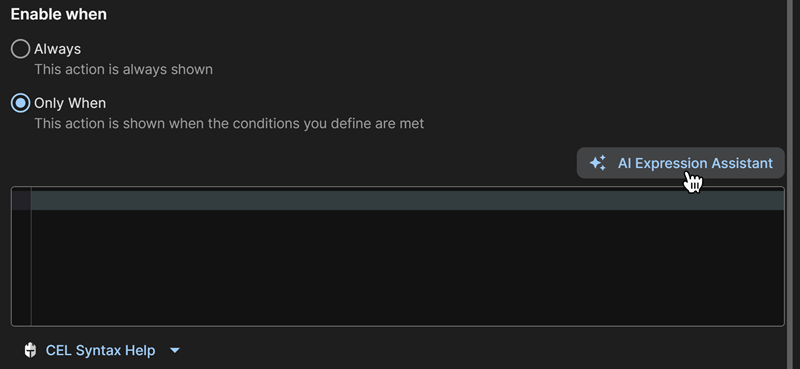
Open AI Expression Assistant. -
Enter your desired criteria, then click Generate.
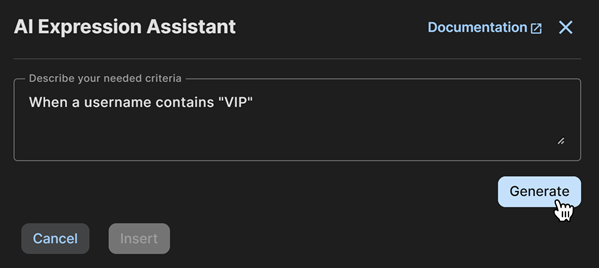
Enter natural language criteria. -
The assistant generates the expression in CEL syntax with a description of its function. For a detailed explanation, click Step By Step Explanation.
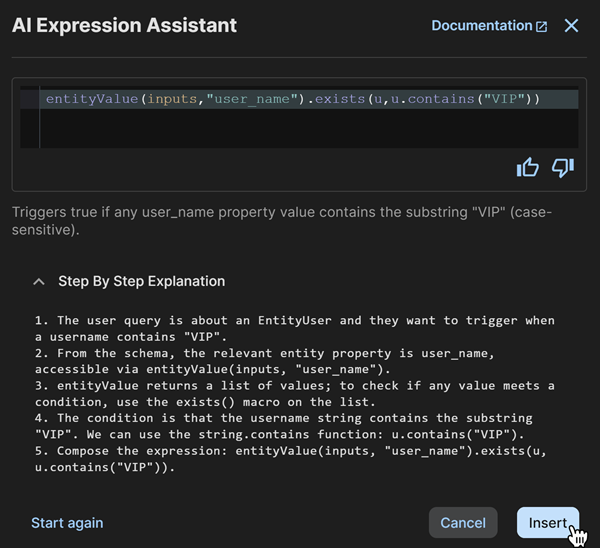
Review generated expression. Tip
Click the Feedback icons to provide feedback on the AI-generated expression.
-
If you're satisfied with the expression, click Insert. Otherwise, click Start again to reset the assistant and try again.