Veeam Integration Guide🔗
Veeam Backup & Replication is a comprehensive data protection and disaster recovery solution. With Veeam Backup & Replication, you can create image-level backups of virtual, physical, and cloud machines and restore from them. The technology used in the product optimizes data transfer and resource consumption, helping minimize storage costs and recovery time in the event of a disaster.
The following instructions are for configuring Veeam to facilitate log ingestion into Secureworks® Taegis™ XDR.
Note
This integration is an on-premises-only deployment.
Data Provided from Integration🔗
| Normalized Data | Out-of-the-Box Detections | Vendor-Specific Detections | |
|---|---|---|---|
| Veeam | Antivirus, Auth, CloudAudit | Auth | Antivirus, CloudAudit |
Note
XDR detectors are not guaranteed to be triggered, even if a data source's logs are normalized to a schema associated with a given detector. However, you can create Custom Detection Rules to generate detections based on normalized data from a data source.
Key Steps🔗
The key steps in a Veeam integration are as follows:
- Install and configure a data collector if you haven't already done so.
- Configure Veeam to send data to the data collector.
- Optionally, get additional data from Veeam using the "four-eyes" feature.
Requirements🔗
The following is required for Veeam configuration:
- Veeam Backup & Replication version 12.1 or later.
- Check the requirements for the data collector you are using by reviewing the guides at Data Collectors.
Add a Veeam Integration🔗
To integrate Veeam, you must first install a data collector, then configure Veeam to send logs to it.
Install and Configure a Data Collector🔗
Veeam Backup & Replication must be configured to send logs to the data collector. Logs are filtered and correlated in real-time for various security event observations. Go to Data Collectors and follow the guide for creating a data collector if you haven't already done so.
Configure Logging and Turn on Monitoring🔗
Once the data collector is created, you can configure Veeam Backup & Replication to send data to XDR.
To set up event forwarding via syslog, do as follows:
- Follow the steps in Veeam's own guide: Configuring Syslog Servers.
-
Be sure to configure the following data collector details:
- IP address: The data collector's server IP address
- Port: 514 or 601
Your Veeam Backup & Replication data should appear in the data lake after validation.
Get Additional Data from Veeam🔗
To get data about additional Veeam events, we recommend that you turn on Veeam's four-eyes authorization.
Four-eyes authorization requires you to get additional authorization from other administrators for actions that could affect sensitive data, such as deleting backups. If you turn the feature on, details of these authorization events are sent to XDR for analysis.
Before you turn on four-eyes authorization, check that you meet the requirements:
- You need at least two users with the Veeam Backup Administrator role. The role can be assigned to the users or to a group they're members of.
- You must configure email notifications for administrators. Veeam can then send administrators requests to approve actions. See Configuring Global Email Notification Settings.
To turn on four-eyes authorization, do as follows:
- Open the Veeam Backup & Replication console.
- From the main menu, select Users and Roles.
-
Go to the Authorization tab and do as follows:
- Select Require additional approval for sensitive operations.
- Specify the time period during which the requested operation must be approved or rejected (minimum 1 day, maximum 30).
- Click OK.
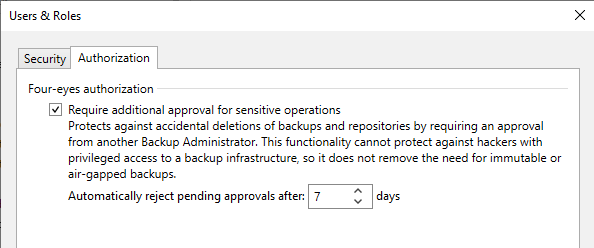
Veeam Authorization tab on Users and Roles page.